Environment Context: PostgreSQL 18.1 on Docker Compose
- Component/Version: PostgreSQL 18.1 (Debian 18.1-1.pgdg13+2)
- Deployment Method: Docker Compose with declared service, volume, and custom network
- Host OS: Linux (unspecified distribution; container base is Debian trixie)
- Port Mapping:
5432:5432 - Environment Variable:
POSTGRES_PASSWORD=postgres - Volume:
postgres_data:/var/lib/postgresql - Network: Custom bridge network
react-2.0_net_dev - Relevant Config Paths:
Raw Error Log: Authentication Failure and Role Absence
The following errors appeared in container logs and during interactive shell attempts:
2026-04-22 05:29:23.308 UTC [77] FATAL:  password authentication failed for user "postgres"
2026-04-22 05:29:23.308 UTC [77] DETAIL:  Connection matched file "/var/lib/postgresql/18/docker/pg_hba.conf" line 128: "host all all all scram-sha-256"
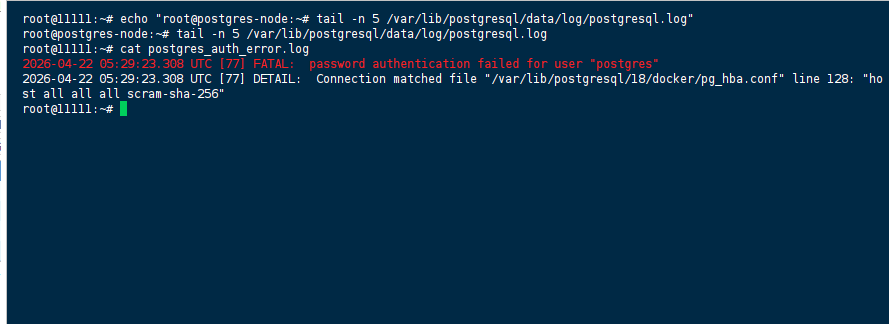
When attempting to connect via psql inside the container without specifying a user:
root@bc2c1ce69477:/# psql
psql: error: connection to server on socket "/var/run/postgresql/.s.PGSQL.5432" failed: FATAL:  role "root" does not
exist

Failed Attempts: Why psql Without Flags and Prisma Studio Defaults Failed
- Connecting via
psqlwith no arguments: The PostgreSQL client defaults to the current operating system user (root) as the database role. Since norootrole exists in the PostgreSQL instance, the connection was rejected. - Connecting via
psql -U postgres(without-h): This command succeeded in establishing a local socket connection, but Prisma Studio continued to fail. The socket-based connection (/var/run/postgresql/.s.PGSQL.5432) worked forpsqlbecause the container’s local Unix-domain socket is accessible by default, but Prisma Studio’s connection logic (and many application-level clients) defaults to TCP/IP overlocalhostor the container’s hostname. The socket path does not resolve to a TCP endpoint that Prisma Studio can use without explicithostconfiguration. - Relying solely on the
POSTGRES_PASSWORDenvironment variable: The password was correctly set (postgres), but password authentication failure persisted because the client was not connecting to the expected TCP/IP endpoint. Thepg_hba.conflinehost all all all scram-sha-256permits password-based authentication over TCP/IP, but the client must actually use TCP/IP for that rule to apply. Socket connections follow a differentlocalauthentication line (typicallypeerormd5), which was not the root cause here.
The Solution: Explicitly Specify -h localhost for TCP/IP Connections
The issue was resolved by forcing the PostgreSQL client to connect via TCP/IP to localhost rather than relying on the default Unix-domain socket.
Permanent fix (inside the container or from the host):
psql -U postgres -h localhost
This command explicitly instructs psql to use TCP/IP over the loopback interface, which matches the host all all all scram-sha-256 rule in pg_hba.conf and prompts for the password correctly.
For Prisma Studio (or any application‑level client), ensure the database connection string includes the host parameter:
DATABASE_URL="postgresql://postgres:postgres@localhost:5432/postgres?schema=public"
or, if connecting from outside the container:
DATABASE_URL="postgresql://postgres:[email protected]:5432/postgres?schema=public"
Why this works:
PostgreSQL’s libpq client library prioritizes Unix-domain sockets when no host is specified. On Docker, the socket path (/var/run/postgresql/.s.PGSQL.5432) is valid, but many tools (Prisma Studio, ORMs, and connection poolers) expect a TCP hostname. Explicitly setting -h localhost (or host=localhost in a connection string) forces TCP/IP and triggers the correct pg_hba.conf authentication rule.
Temporary workaround (if you cannot modify the connection string):
Exec into the container and use psql -U postgres -h localhost to perform manual operations. Note that this does not fix external clients — they require the host parameter in their connection URIs.
References
- Official PostgreSQL Documentation: Client Authentication –
pg_hba.conffile - Official PostgreSQL Documentation: libpq – Connection Strings
- Docker Official Image: PostgreSQL – Environment Variables and Authentication
- Prisma Documentation: Database Connection URLs
(Last verified: 22 April 2026 — PostgreSQL 18.1, Debian trixie)
