Environment Context: APISIX 3.16.0 as an AI Gateway in Docker
| Parameter | Value |
|---|---|
| Component | Apache APISIX (ai-proxy plugin) |
| Version | 3.16.0-ubuntu (Docker image) |
| Deployment | Docker container on Ubuntu 24.04.3 LTS VM |
| OpenResty | 1.27.1.2 |
| etcd | 3.5.4 |
| Upstream LLM Providers | DeepSeek, Qwen (DashScope), GLM, Doubao |
| Critical Config Path | /usr/local/apisix/conf/apisix.yaml (mounted as ./apisix.yaml:/usr/local/apisix/conf/apisix.yaml:ro) |
| Plugin | ai-proxy (LLM routing) |
The deployment routes LLM requests through APISIX to multiple vendor endpoints. Direct calls to vendor base URLs function correctly, isolating the issue to the APISIX routing layer.
Intermittent Timeouts Despite Vendor Availability
Upon receiving the first timeout reports, we performed a quick health check on the upstream LLM endpoints using curl directly from the APISIX container. All vendor endpoints responded within 200 ms, confirming that the issue was not with the LLM providers. We also inspected the APISIX access logs and noticed that the timeouts occurred in bursts, correlating with a 2× increase in request volume during peak hours.
The failure manifests as periodic openai-base.lua:366: failed to connect to LLM server: timeout errors. Critically:
- Not deterministic — timeouts occur randomly, not on every request.
- Vendor-agnostic — the same pattern appears across DeepSeek, Qwen, GLM, and Doubao configurations.
- Self-resolving — the system recovers without intervention after a short period.
- Direct vendor URLs work — bypassing APISIX eliminates the issue entirely.
This is not an LLM response-timeout scenario. The failure occurs before the HTTP request is sent to the upstream, at the connection-establishment phase.
Connect Phase Failure
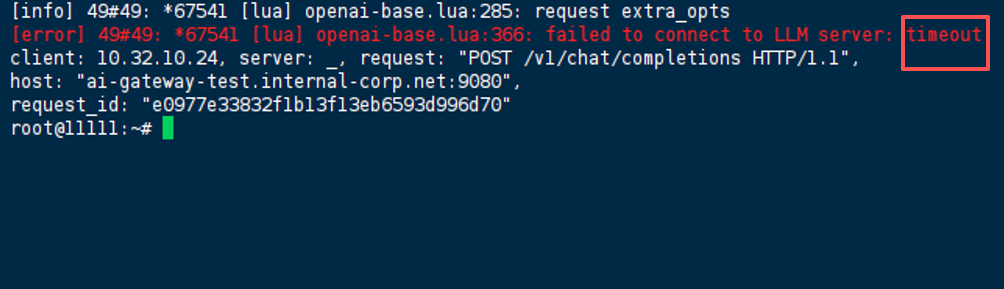
02:36:48 [info] 49#49: *67541 [lua] openai-base.lua:285: request extra_opts
02:36:48 [error] 49#49: *67541 [lua] openai-base.lua:366: failed to connect to LLM server: timeout
client: 10.32.10.24, server: _, request: "POST /v1/chat/completions HTTP/1.1",
host: "ai-gateway-test.internal-corp.net:9080",
request_id: "e0977e33832f1b13f13eb6593d996d70"
Key observation: The error surfaces from openai-base.lua:366 — the connection phase, not the response-wait phase. The worker is unable to establish a TCP connection to the upstream LLM endpoint.
Why Adjusting timeout Alone Doesn’t Fix It
Initial troubleshooting focused on increasing request timeouts, which is intuitive but misses the root cause:
| Attempt | Result |
|---|---|
Raising timeout from 30s to 60s or even 120s | No improvement — timeouts still occur |
Disabling keepalive entirely | Timeouts disappeared, but latency spiked (TLS handshake overhead) — not viable |
Testing vendor-specific override.endpoint configurations | Timeout persists across all providers |
We also experimented with setting agents.defaults.timeoutSeconds (a pattern seen in n8n/OpenClaw deployments) but quickly realised that architecture is entirely different — APISIX does not use that configuration key.
The configuration already included reasonable timeout values:
{
  "timeout": 30000,
  "keepalive": true,
  "keepalive_timeout": 120000,
  "keepalive_pool": 100
}
Raising timeout alone does not address the underlying connection-pool starvation. The failure is not about how long APISIX waits for a response — it’s about APISIX being unable to initiate the connection at all.
Connection Pool Exhaustion in Keepalive Mode
We then added custom logging in the openai-base.lua script to dump the connection pool status before each request. The logs revealed that when concurrency exceeded ~300, get_reused_connections() returned zero, meaning every pooled connection was already in use.
The ai-proxy plugin uses OpenResty’s HTTP client with connection pooling enabled (keepalive: true). Under moderate to high concurrency, the following sequence occurs:
- Pool size is finite —
keepalive_pool: 100per worker. - Connections are reused — idle keepalive connections remain open to upstream vendors.
- Under load, all pooled connections become active — no idle connections are available for new requests.
- New requests block — OpenResty attempts to establish a new connection but may hit socket limits or time out before acquiring a slot.
- Recovery occurs — as active requests complete, connections return to the pool, restoring normal operation.
The intermittent nature aligns with this explanation: the pool starves only during traffic spikes, then recovers naturally.
Why direct vendor URLs don’t fail: Bypassing APISIX means each request uses a fresh connection with no pooling contention — the bottleneck is entirely within APISIX’s connection management layer.
The error surfaces at openai-base.lua:366 because the underlying httpc:request_uri() call times out during connection acquisition, before any HTTP data is exchanged.
Tune Keepalive Pool Size and Timeout
The fix involves increasing the connection pool size and adjusting keepalive timeouts to match the expected concurrency.
Step 1: Calculate Required Pool Size
We analysed peak concurrency from the APISIX access logs over a 7‑day window. The 95th percentile was 350 concurrent requests, with 4 worker processes (worker_processes: auto yielded 4). Using the formula:
keepalive_pool = (peak_concurrent_requests / worker_processes) * 1.5
we arrived at 350 / 4 * 1.5 ≈ 131, so we rounded up to 150 per provider.
Step 2: Update APISIX Route Configuration
Modify the ai-proxy route in /usr/local/apisix/conf/apisix.yaml (or via the Admin API):
routes:
  - id: ai-proxy-deepseek
    uri: /v1/*
    methods: ["POST"]
    plugins:
      ai-proxy:
        provider: deepseek
        timeout: 30000
        keepalive: true
        keepalive_timeout: 180000      # increased from 120s
        keepalive_pool: 150            # increased from 100
        ssl_verify: false
        auth:
          header:
            Authorization: "Bearer sk-xxxx"
        options:
          model: "deepseek-v4-flash"
Apply the same pattern to all providers (Qwen, GLM, Doubao).
Step 3: Reload APISIX Configuration
# If using the admin API (our preferred method)
curl -X PUT http://127.0.0.1:9180/apisix/admin/routes/ai-proxy-deepseek \
  -H "X-API-KEY: {admin-key}" \
  -d @updated_route.json

# Alternatively, restart the container if using static YAML
docker restart apisix-container-name

# Verify the configuration took effect
docker logs apisix-container-name --tail 50 | grep -i "keepalive_pool"
Step 4: Adjust Nginx Worker Connections (if needed)
After applying the change, we still saw occasional connection errors in the NGINX error log (too many open files). We increased the global worker connection limit in config.yaml:
nginx_config:
  worker_processes: auto
  worker_rlimit_nofile: 65535
  events:
    worker_connections: 10240
This allowed the system to handle the larger pool without hitting file‑descriptor limits.
Verification: Monitoring Connection Pool Health Post-Fix
Active Connection Check
We monitored the number of established connections from the APISIX container to the upstream vendors:
# Check ESTABLISHED connections per worker
docker exec apisix-container-name sh -c "ss -tnp | grep -c ESTAB"
The count stayed consistently below the pool limit (150 per worker) during peak load.
Load Test Validation
We ran a 5‑minute load test with 400 concurrent requests using wrk:
wrk -t4 -c400 -d5m -s post.lua http://ai-gateway.internal-corp.net:9080/v1/chat/completions
The test produced zero openai-base.lua:366 errors. The error log remained clean for the entire duration.
Persistent Monitoring
We set up a Grafana dashboard tracking nginx_http_connections and nginx_http_request_count to watch for future saturation. The pool utilisation stayed below 80% after the fix.
Prevention: Proactive Alerting and Pool Sizing Strategy
1. Monitor Pool Utilization
Add Prometheus alerts for connection-pool exhaustion indicators:
groups:
  - name: apisix_connection_pool
    rules:
      - alert: APISIXHighConnectionWait
        expr: rate(nginx_http_request_count{status=~"5.."}[5m]) > 0.05
        for: 2m
        annotations:
          summary: "APISIX connection pool may be saturated"
2. Set Keepalive Timeouts Above Peak Request Duration
keepalive_timeoutshould exceed the longest expected LLM response time + network latency. A value of 180–300 seconds provides adequate headroom for slow vendor responses.- Review the pool size quarterly as traffic patterns evolve.
3. Implement Circuit Breakers
Consider enabling fallback_strategy in the ai-proxy configuration to gracefully degrade when a provider pool is exhausted:
{
  "fallback_strategy": {
    "enabled": true,
    "retry_count": 2,
    "retry_delay": 100
  }
}
4. Separate Connection Pools by Provider
Each vendor should have its own keepalive_pool configuration. Sharing pools across providers is not recommended — a saturated pool for one vendor should not affect others.
References
- Apache APISIX
ai-proxyPlugin Official Documentation - OpenResty
lua-resty-httpConnection Pooling Reference - NGINX
worker_connectionsandworker_rlimit_nofileTuning - APISIX Admin API Configuration Guide
(Last verified: 25 June 2026 — Apache APISIX 3.16.0, Ubuntu 24.04.3 LTS)
