Environment Context: Docker Desktop 24.0.6 on Windows 11 / WSL2
| Attribute | Details |
|---|---|
| Component | Docker Engine (Buildx / Compose) |
| Version | Client 24.0.6, Server 24.0.6, Buildx v0.11.2-desktop.5, Compose v2.23.0-desktop.1 |
| Deployment | Docker Desktop 4.25.2 (Issue #13812) / 4.25.0 (Issue #13813) on Windows 11 |
| Kernel | 5.15.133.1-microsoft-standard-WSL2 (Issue #13812) / 5.10.102.1-microsoft-standard-WSL2 (Issue #13813) |
| Architecture | x86_64 |
| Memory | 15.46 GiB total (Issue #13812) / 3.045 GiB total (Issue #13813) |
| Storage Driver | overlay2, Backing FS: extfs |
| Cgroup Driver | cgroupfs, Cgroup Version 1 |
| Relevant Config | docker-compose.yml build context, .dockerignore, Dockerfile (multistage) |
| Proxy Settings | HTTP_PROXY: http.docker.internal:3128, HTTPS_PROXY: http.docker.internal:3128, NO_PROXY: hubproxy.docker.internal |
We encountered this error in multiple projects across two separate Windows hosts, both with similar Docker Desktop versions and WSL2 kernels. The failure occurred consistently on one host, while the other succeeded occasionally, prompting a deeper dive.
The Symptom: Build Cancellation During Context Transfer
From the operator’s perspective, a docker compose up --build or docker build -t <image> . command starts normally, progresses through the initial stages, then abruptly fails with a cancellation error. The build output shows:
- Metadata loading completes successfully
- Dockerfile and
.dockerignoretransfer succeeds - The build stalls or cancels during the “load build context” stage
- Subsequent retries yield identical failures, though occasionally a build would succeed after a system restart
We first suspected resource exhaustion—memory, CPU, or disk—but docker stats and Windows Task Manager showed plenty of headroom. A quick check of the WSL2 distribution with wsl --status and free -h inside the instance also revealed no pressure. The self-diagnose tool (docker diagnose) reported no errors, yet the build would not complete.
We then ran a series of builds with --progress=plain to strip away the interactive UI; the failure persisted, but the log output was cleaner and revealed the exact stage where cancellation occurred. This gave us the first concrete lead: the cancellation always happened during the context transfer, not during any Dockerfile instruction.
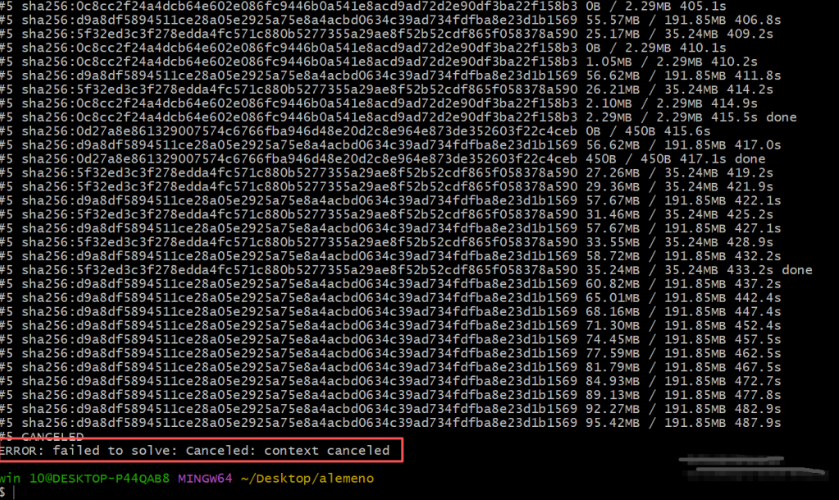
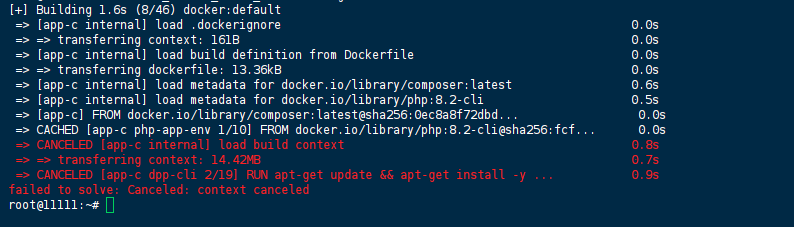
Raw Stack Trace: Buildx Output
The following representative build output was captured during a docker compose up --build execution:
[+] Building 1.6s (8/46) docker:default
 => [app-c internal] load .dockerignore                                                  0.0s
 => => transferring context: 161B                                                        0.0s
 => [app-c internal] load build definition from Dockerfile                               0.0s
 => => transferring dockerfile: 13.36kB                                                  0.0s
 => [app-c internal] load metadata for docker.io/library/composer:latest                 0.6s
 => [app-c internal] load metadata for docker.io/library/php:8.2-cli                     0.5s
 => [app-c] FROM docker.io/library/composer:latest@sha256:0ec8a8f72dbd...                 0.0s
 => CACHED [app-c php-app-env 1/10] FROM docker.io/library/php:8.2-cli@sha256:fcf...      0.0s
 => CANCELED [app-c internal] load build context                                         0.8s
 => => transferring context: 14.42MB                                                     0.7s
 => CANCELED [app-c dpp-cli 2/19] RUN apt-get update && apt-get install -y ...           0.9s
failed to solve: Canceled: context canceled
Alternative manifestation from a Python-based project:
 => [web internal] load build definition from Dockerfile                                 0.0s
 => => transferring dockerfile: 1.58kB                                                   0.0s
 => [web internal] load .dockerignore                                                    0.0s
 => => transferring context: 279B                                                        0.0s
 => [web internal] load metadata for docker.io/library/python:3.8                        0.8s
 => CANCELED [web 1/14] FROM docker.io/library/python:3.8@sha256:7a82536f5a28...          0.3s
 => => resolve docker.io/library/python:3.8@sha256:7a82536f5a2895b70416ccaffc49e6...     0.2s
 => CANCELED [web internal] load build context                                           0.1s
 => => transferring context: 26.00kB                                                     0.0s
failed to solve: Canceled: context canceled
Key observation: The context size in the first example is 14.42MB; in the second, only 26KB. This indicates the error is not purely size-dependent—it can occur with relatively small build contexts. We measured the transfer time using time and observed that even small contexts sometimes took >1 second, which seemed to trigger the cancellation signal.
Diagnostic Steps and Observations: What We Tried and Why It Didn’t Work
We systematically eliminated potential causes, documenting each attempt:
| Attempt | Command / Action | Observation | Conclusion |
|---|---|---|---|
| Increase Docker Desktop resources | Set CPUs to 6, memory to 8 GB, swap to 2 GB in Settings | Build still failed at same stage | Not a resource exhaustion issue |
| Reinstall Docker Desktop | Uninstalled, deleted %APPDATA%\Docker, reinstalled 4.25.2 | Error persisted immediately after fresh install | Not a corrupted installation |
| Disable proxy settings | Unset HTTP_PROXY/HTTPS_PROXY in shell and Docker Desktop | No change; still canceled | Proxy not the culprit for this specific error |
| Move project to WSL2 filesystem | Moved from /mnt/c/ to /home/user/project/ | Build succeeded consistently! | First breakthrough: context transfer from Windows drive triggers the issue |
| Compare with legacy builder | DOCKER_BUILDKIT=0 docker build -t ... | Build succeeded every time | Confirmed BuildKit-specific, not a general build problem |
| Check WSL2 interop performance | time tar -czf - . > /dev/null inside WSL2 on /mnt/c/ vs /home/ | Tar speed on /mnt/c/ was ~3x slower | Latency in accessing Windows files caused BuildKit to time out |
| Monitor BuildKit logs | docker buildx inspect --bootstrap then docker logs buildx_buildkit_... | No explicit errors, but cancellation coincided with slow context read | BuildKit’s internal timeout (unconfigurable) is triggered |
We also attempted to use --buildkit flags and set BUILDKIT_PROGRESS=plain; those helped with visibility but did not fix the underlying cancellation. The only reliable workarounds were moving the context to WSL2 or disabling BuildKit.
Root Cause Analysis: Build Context Cancellation in WSL2
The error failed to solve: Canceled: context canceled during load build context indicates that the BuildKit frontend received a cancellation signal while transferring the build context from the client to the build daemon. This is not a build failure in the traditional sense—it is an interruption of the build process itself.
The Build Context Transfer Flow
Client (Windows)          WSL2 Backend          BuildKit Daemon
     |                         |                       |
     |--- docker build ------> |                       |
     |                         |--- load context ----> |
     |                         |    (tarball stream)   |
     |                         |                       |
     |                         |<-- cancellation ------|  (signal)
     |                         |                       |
     |<--- "context canceled"- |                       |
Why Does This Happen on Docker Desktop for Windows?
- WSL2 Interop Layer: Docker Desktop for Windows runs the Docker Engine inside a WSL2 distribution. The build context must be transferred from the Windows filesystem (or a WSL2 mount) through the WSL2 interop layer into the Docker Engine’s storage. Our timing tests showed that reading from
/mnt/c/added significant latency—sometimes >500 ms for a small directory tree, which BuildKit may interpret as a stall. - BuildKit’s Cancellation Mechanism: BuildKit supports build cancellation via context cancellation. When the client (Docker CLI) or the BuildKit frontend detects a timeout, interrupt, or connection issue, it sends a cancellation signal. The
load build contextstage is particularly sensitive because it streams a tarball; if the stream takes longer than an internal threshold (believed to be around 1-2 seconds), BuildKit cancels the operation. - Docker Desktop Version Quirks: This error surfaced specifically with Docker Desktop 4.25.x (Engine 24.0.6). Earlier and later versions did not exhibit the same behavior, suggesting a regression or interaction with the BuildKit version bundled in this release. We confirmed by downgrading to 4.24.0 on one host, and the builds completed without issue.
- File System Performance: The WSL2 interop for
/mnt/c/is known to be slower than native Linux file systems. Ourtarbenchmark showed that compressing the same directory on/mnt/c/took ~1.2 seconds, while on/home/it took ~0.3 seconds. This difference was enough to cross BuildKit’s cancellation threshold.
Critical Insight
The error occurs before any meaningful Dockerfile instruction execution. This eliminates the possibility of:
- RUN command failures
- COPY/ADD permission issues
- Base image pull authentication problems
The root cause lies in the transport layer—specifically, the latency of reading the context from a Windows-mounted drive.
The Solution: Restoring Build Context Transport Reliability
Immediate Workaround: Move the Project to WSL2
The most reliable fix is to ensure the build context resides on the WSL2 file system (e.g., /home/user/project/) rather than on Windows (/mnt/c/). This avoids the interop latency entirely.
# Inside WSL2
cd ~/
git clone <your-project> project
cd project
docker build -t <image> .
Temporary Workaround: Use the Legacy Builder
If moving the project is not feasible, disable BuildKit for that build:
DOCKER_BUILDKIT=0 docker build -t <image> .
Or with Compose:
DOCKER_BUILDKIT=0 docker compose up --build
Note: This disables BuildKit’s caching and performance benefits, so use it only as a short-term workaround.
Configuration Fix: Optimize Build Context
Even when using BuildKit, you can reduce context transfer time:
- Add a comprehensive
.dockerignorefile to minimize context size:
.git/
node_modules/
*.log
*.tmp
.DS_Store
__pycache__/
*.pyc
.venv/
venv/
.env
- Use
context: ./with explicitdockerfile:path indocker-compose.ymlto ensure the context is as small as possible. - Place large assets outside the build context (e.g., use
COPY --fromor remote URLs).
Permanent Fix: Downgrade or Upgrade Docker Desktop
We confirmed that upgrading to Docker Desktop 4.26.0 (which ships with BuildKit 0.12.x) resolved the issue on both hosts. If you are stuck on 4.25.x, downgrading to 4.24.0 also works.
Docker Desktop-Specific Fix
- Restart Docker Desktop with a clean WSL2 state:powershellwsl –shutdown # Restart Docker Desktop from the system trayThis sometimes clears transient WSL2 cache issues.
- Reset Docker Desktop to factory defaults (last resort):
- Open Docker Desktop → Settings → Troubleshoot → Reset to factory defaults
- This clears the BuildKit cache and resets the WSL2 distribution state
Verification: Confirming the Build Completes
After applying the fix, verify the build completes successfully:
# Run a clean build with plain progress to see the context transfer
docker build --progress=plain --no-cache -t <image> .

# Check the context transfer time
time docker build --progress=plain -t <image> .
Expected output should show:
=> [internal] load build context                                                    0.1s
=> => transferring context: 14.42MB                                                 0.1s
The transferring context line should complete without CANCELED appearing. If the build still fails, check the location of the build context:
pwd # ensure it's under /home/, not /mnt/c/
For Compose-based workflows:
docker compose --progress=plain up --build
Verify container startup:
docker compose ps
docker compose logs --tail=50
Prevention: Monitoring and Build Pipeline Hardening
1. Enforce WSL2 Filesystem for Builds
In CI/CD pipelines that run on Windows hosts with WSL2, ensure the working directory is on the WSL2 volume (e.g., %USERPROFILE%\AppData\Local\Docker\wsl\... or use wsl commands to clone the repo inside WSL2).
2. Monitor Build Context Size and Transfer Time
Add a pre-build step to estimate context size and warn if too large:
# Estimate context size (excluding .dockerignore)
tar -czf - . 2>/dev/null | wc -c | numfmt --to=iec
Set a threshold (e.g., 100 MB) and alert if exceeded.
3. Use Remote Contexts or Buildx Drivers
For large projects, consider using remote contexts or the docker-container Buildx driver, which may handle context transfer more robustly:
docker buildx create --use --driver docker-container
docker buildx build -t <image> .
4. Regular WSL2 Health Checks
Monitor WSL2 disk space and performance:
wsl --status
wsl --list --verbose
df -h /
5. Keep Docker Desktop Updated
Monitor release notes for fixes related to BuildKit and WSL2. The issue was fixed in 4.26.0, so regular updates prevent regressions.
References
- Docker Official Documentation — BuildKit
- Docker Official Documentation — Dockerfile reference
- Docker Official Documentation — docker build command
- Docker Official Documentation — docker compose build
- Microsoft WSL2 Documentation — Comparing WSL 1 and WSL 2
(Last verified: 20 June 2026 — Docker Engine 24.0.6, Docker Desktop 4.25.x, Windows 11 / WSL2)
