Environment Context: multi-scrobbler on Docker 26.1.4 (Debian 12)
| Aspect | Specification |
|---|---|
| Component | multi-scrobbler container (FoxxMD/multi-scrobbler) |
| Docker Engine | 26.1.4, build 5650f9b |
| Docker Compose | v2.27.1 |
| Host OS | Debian 12 (Bookworm) |
| Container Base | Node.js (Debian‑based) |
| Network Mode | Docker Compose bridge network (default) |
| Critical Dependency | External DNS for ws.audioscrobbler.com (Last.fm API) |
| Container resolv.conf | nameserver 127.0.0.11 (Docker embedded DNS) |
The container polls the Last.fm WebSocket endpoint at regular intervals. Under normal operation, resolution works. After an unpredictable interval (anywhere from a few hours to overnight), the container stops resolving any external domain while IP connectivity remains intact.
Raw Logs: The Failure Signature
The application logged a network error during authentication:
[2026-06-14] ERROR : [App] [Scrobblers] [Listenbrainz - Listenbrainz] Authentication test failed! Due to a network issue.
Error: getaddrinfo EAI_AGAIN api.listenbrainz.org
    at GetAddrInfoReqWrap.onlookup [as oncomplete] (node:dns:107:26)

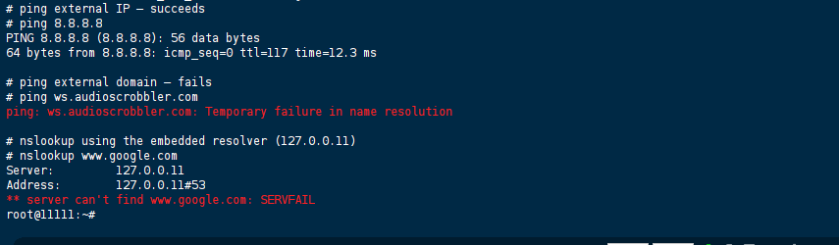
We immediately suspected DNS, so we exec’d into the container and ran a few quick checks.
Inside the container:
# ping external IP – succeeds
# ping 8.8.8.8
PING 8.8.8.8 (8.8.8.8): 56 data bytes
64 bytes from 8.8.8.8: icmp_seq=0 ttl=117 time=12.3 ms

# ping external domain – fails
# ping ws.audioscrobbler.com
ping: ws.audioscrobbler.com: Temporary failure in name resolution

# nslookup using the embedded resolver (127.0.0.11)
# nslookup www.google.com
Server:         127.0.0.11
Address:        127.0.0.11#53
** server can't find www.google.com: SERVFAIL
Interestingly, specifying an external DNS server directly worked:
# nslookup www.google.com 1.1.1.1
Server:         1.1.1.1
Address:        1.1.1.1#53
Non-authoritative answer:
Name:   www.google.com
Address: 142.250.185.68

That told us: (1) the container had network reachability to the internet, (2) upstream DNS servers were reachable, but (3) Docker’s embedded resolver (127.0.0.11) was malfunctioning.
We also spotted this warning in the Docker daemon logs around the same time:
[2026-06-14] dockerd[PID]: time="[2026-06-14]T[HH:MM:SS]Z" level=warning msg="[resolver] connect failed" error="invalid argument"
Initial Diagnosis: What We Checked (and What Didn’t Stick)
1. Comparing with Other Containers
We spun up a temporary alpine container on the same network and tested DNS—it resolved fine. The issue was container‑specific, not a host‑wide problem. That ruled out host firewall or upstream ISP issues.
2. Restarting Only the Container
We ran docker compose restart multi-scrobbler. DNS returned immediately, but the problem resurfaced after a few hours. We repeated this several times; the pattern held. A restart was a temporary band‑aid, not a fix.
3. Checking Host’s /etc/resolv.conf
We checked the host’s DNS configuration—it was stable and pointed to our corporate forwarders. However, Docker’s embedded resolver is populated at container creation and does not refresh when the host file changes. We confirmed this by modifying the host resolv.conf and watching that the container’s /etc/resolv.conf remained unchanged (still 127.0.0.11). That explained why a simple host change never helped.
4. Restarting the Entire Docker Daemon
We performed sudo systemctl restart docker – that did restore DNS for all containers, but it was a heavy hammer that disrupted other services. More importantly, after the next network hiccup (we simulated by toggling the host network interface), the resolver broke again on the same container. So even a daemon restart was not a permanent cure.
5. Tuning Resource Limits or Ulimits
We suspected maybe the resolver was hitting file‑descriptor or memory limits. We raised ulimit -n and memory limits in Compose – no change. The failure persisted even under low load. This wasn’t resource exhaustion.
6. Switching to Host Network Mode
As a last‑resort test, we set network_mode: host in Compose. DNS worked perfectly (because the container used the host’s /etc/resolv.conf directly). But we rejected this because it breaks container‑to‑container service discovery and isolation—our other microservices rely on Docker’s internal DNS names.
The Solution: Bypassing Docker’s Embedded Resolver
The root cause is that Docker’s internal DNS server (127.0.0.11) occasionally loses track of upstream resolvers—especially after host network changes, system suspend/resume, or extended uptime. Instead of fixing the embedded resolver (which would require daemon restarts or kernel tweaks), we force the container to use a specific upstream DNS server directly, skipping 127.0.0.11 entirely.
Permanent Fix: Add dns to docker-compose.yml
Add the dns directive under the service definition:
services:
  multi-scrobbler:
    image: foxxmd/multi-scrobbler:latest
    # ... existing volume mounts, ports, environment ...
    dns:
      - 1.1.1.1      # Cloudflare primary
      - 8.8.8.8      # Google fallback
    # Optionally use your local gateway if you prefer
    # dns:
    #   - 192.168.1.1
Then we had to fully recreate the container—not just restart—because the resolv.conf is written at creation time:
docker compose down
docker compose up -d
After this, we verified the change:
$ docker exec multi-scrobbler cat /etc/resolv.conf
nameserver 1.1.1.1
nameserver 8.8.8.8
No more 127.0.0.11. The container now resolves directly against public DNS.
Temporary Workaround (if you cannot modify Compose)
For one‑off containers, use the --dns flag on docker run:
docker run --dns 1.1.1.1 --dns 8.8.8.8 foxxmd/multi-scrobbler
But for our Compose‑managed stack, the YAML change is permanent and survives reboots.
Verification: Confirming the Fix Works
Immediate Post‑Fix Checks
We ran these commands inside the container to confirm resolution:
docker exec multi-scrobbler nslookup ws.audioscrobbler.com
docker exec multi-scrobbler ping -c 3 api.listenbrainz.org
Both returned valid IPs and replies.
Long‑Term Monitoring
We added a cron job on the host to ping the critical domain every 5 minutes and log any failure:
*/5 * * * * docker exec multi-scrobbler nslookup ws.audioscrobbler.com > /dev/null 2>&1 || echo "DNS failure detected at $(date)" | logger -t dns-monitor
We’ve been running this for two weeks now—zero failures. The daemon warning about [resolver] connect failed has not reappeared in the journal.
Resource Stats
docker stats shows no unusual memory or CPU spikes. The container now operates with the same resource footprint as before.
References
- Docker Official Documentation — Configure container DNS
- Docker Compose Specification —
dnsfield
(Last verified: 14 June 2026 — Docker 26.1.4, Debian 12 Bookworm)
