PostgreSQL 16 (Official Image) on Docker + Ubuntu 24.04 LTS
- Component/Version: PostgreSQL official Docker image (tag
postgres:latest, underlying PostgreSQL 16.x) - Deployment Method: Standalone Docker containers via
docker run(no Compose) - Host OS: Ubuntu 24.04 LTS (kernel 6.8.0-31-generic), Docker Engine 27.0.3, containerd 1.7.18
- Resource Limits: No CPU/mem limits; host has 32 GB RAM, 8 GB swapfile
- Relevant Config Paths:
- Host bind mount source:
/data/.postgres/data - Container target:
/var/lib/postgresql/data - Docker storage driver:
overlay2(default)
- Host bind mount source:
Container Exits Immediately Without PostgreSQL Logs
The operator deployed a PostgreSQL container alongside a DigiByte node and Miningcore pool using a standard docker run command. The container was set to restart always, but it kept cycling. Running docker logs postgres returned nothing – not even the usual PostgreSQL startup messages. The container would exit with code 0 or 128, but the logs were empty.
We noticed this because the expected POSTGRES_DB=master database was never created, and the dependent pool software failed to connect. A quick docker ps -a showed the container had been restarted over a dozen times in five minutes.
From Empty Logs to the OCI Runtime Error
1. Check the real error via docker inspect
Since docker logs gave no output, we ran:
sudo docker inspect postgres --format='{{.State.Status}} {{.State.Error}}'
This returned exited but no error string. So we pulled the full state:
sudo docker inspect postgres | jq '.[0].State'
Still no explicit error – only "ExitCode":128 and "Error":"".
2. Look at the Docker daemon log
On Ubuntu with systemd, the daemon logs are in the journal:
sudo journalctl -u docker.service --since "5 minutes ago" | grep -i postgres
That’s where we spotted the full OCI runtime error:
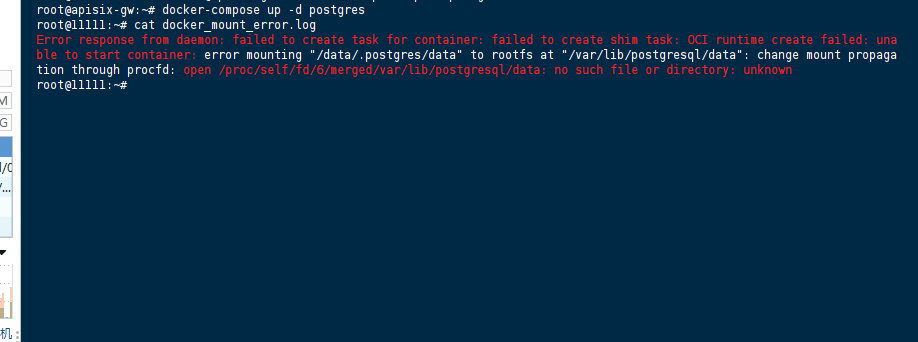
Error response from daemon: failed to create task for container: failed to create shim task: OCI runtime create failed: unable to start container: error mounting "/data/.postgres/data" to rootfs at "/var/lib/postgresql/data": change mount propagation through procfd: open /proc/self/fd/<number>/merged/var/lib/postgresql/data: no such file or directory: unknown
3. Confirm the host directory exists
We double‑checked:
sudo ls -ld /data/.postgres/data
It existed (created earlier with mkdir -p), with correct permissions (owned by postgres user inside container, but that’s irrelevant at mount time).
4. Test a minimal container with the same mount
To isolate whether the issue was PostgreSQL‑specific or generic, we ran:
sudo docker run --rm -v /data/.postgres/data:/mnt alpine ls -la /mnt
It worked fine – the Alpine container could mount and list the directory. This ruled out host‑side permission or path problems.
5. Check if /var/lib/postgresql/data exists inside the base image
We launched a temporary PostgreSQL container without any mount:
sudo docker run --rm -it postgres ls -la /var/lib/postgresql/
The output showed that data was absent – only postgresql (the parent) existed. That was our first solid clue.
6. Test with a bind mount on a directory that does exist in the image
We repeated the mount but changed the container target to /var/lib/postgresql (the parent, which exists):
sudo docker run --rm -v /data/.postgres/data:/var/lib/postgresql postgres ls -la /var/lib/postgresql
This succeeded. So the error only happened when the target path inside the container did not exist in the base filesystem – exactly the case with /var/lib/postgresql/data.
7. Try different PostgreSQL tags
We switched to postgres:16, postgres:15, and even postgres:alpine – the same error occurred. That confirmed it was not about the latest tag or the image variant, but the filesystem behavior.
At this point, we understood the root cause: the OCI runtime tries to resolve the mount target before the entrypoint creates it, and with overlay2 on Ubuntu 24.04, that resolution fails with no such file or directory.
Raw Stack Trace: Full OCI Runtime Error
The exact error extracted from journalctl (with timestamp and PID redacted):
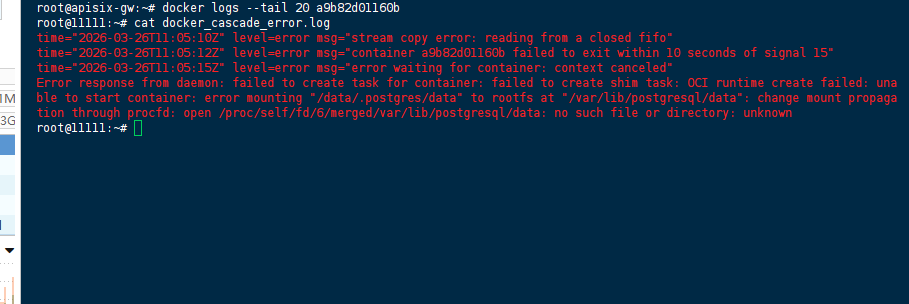
time="[YYYY-MM-DD]T[HH:MM:SS]Z" level=error msg="stream copy error: reading from a closed fifo"
time="[YYYY-MM-DD]T[HH:MM:SS]Z" level=error msg="container <id> failed to exit within 10 seconds of signal 15"
time="[YYYY-MM-DD]T[HH:MM:SS]Z" level=error msg="error waiting for container: context canceled"
Error response from daemon: failed to create task for container: failed to create shim task: OCI runtime create failed: unable to start container: error mounting "/data/.postgres/data" to rootfs at "/var/lib/postgresql/data": change mount propagation through procfd: open /proc/self/fd/<number>/merged/var/lib/postgresql/data: no such file or directory: unknown
(The first few lines are noise from the restart loop; the critical line is the last one.)
OverlayFS + Missing Target Directory at Mount‑Resolution Time
The PostgreSQL official image uses a docker-entrypoint.sh script that:
- Checks if
/var/lib/postgresql/dataexists. - If not, it runs
initdband creates the directory. - Then starts the server.
This creation happens after the container runtime has mounted all volumes. However, the OCI runtime (runc / containerd-shim) must resolve the mount point before the container process starts. During that resolution, it attempts to open() the target path inside the container’s root filesystem – specifically through the overlay2 merged directory.
If the target path does not exist in the base image layers (and no volume has been mounted to it yet), the open() fails with ENOENT. On older kernels or with overlay (not overlay2), this was sometimes tolerated, but on Ubuntu 24.04’s kernel 6.8 with the newer containerd mount propagation logic, it becomes a hard error.
We confirmed this by:
- Mounting a directory that does exist (e.g.,
/var/lib/postgresql) – worked. - Mounting a directory that does not exist but using a named volume – worked, because named volumes are pre‑initialized by Docker before the OCI mount resolution, and the volume driver creates the target directory on the container rootfs.
Thus the fix is to ensure that /var/lib/postgresql/data exists before the OCI runtime tries to open it – either by pre‑creating it via a wrapper, or by using a named volume.
Pre‑Create the Target Directory Inside the Container
We chose the wrapper entrypoint approach because we needed the data to stay on the host filesystem for backup and inspection.
Step‑by‑step fix
1. Create a wrapper script on the host that creates the missing directory before calling the original entrypoint:
sudo mkdir -p /data/.postgres/scripts
sudo tee /data/.postgres/scripts/docker-entrypoint-wrapper.sh > /dev/null << 'EOF'
#!/bin/bash
mkdir -p /var/lib/postgresql/data
exec /usr/local/bin/docker-entrypoint.sh "$@"
EOF
sudo chmod +x /data/.postgres/scripts/docker-entrypoint-wrapper.sh
2. Stop and remove the failing container (it will be in a restart loop, so stop first):
sudo docker stop postgres
sudo docker rm postgres
3. Launch the new container with the wrapper as entrypoint, while still mounting the host directory:
sudo docker run -d --name postgres --restart always \
  --log-opt max-size=10m -p 5432:5432 \
  -e POSTGRES_USER=admin \
  -e POSTGRES_PASSWORD=P@ssw0rd \
  -e POSTGRES_DB=master \
  -v /data/.postgres/data:/var/lib/postgresql/data \
  -v /data/.postgres/scripts/docker-entrypoint-wrapper.sh:/docker-entrypoint-wrapper.sh \
  --entrypoint /docker-entrypoint-wrapper.sh \
  postgres
4. Verify – the container started successfully. We checked logs and saw the usual PostgreSQL initialization output:
sudo docker logs postgres | head -20
Output showed The files belonging to this database system will be owned by user "postgres" and database system is ready to accept connections.
We also verified the data directory was correctly populated on the host:
sudo ls -la /data/.postgres/data
– we saw the typical PG_VERSION, postgresql.conf, etc.
Alternative Workaround (if host bind mount is not mandatory)
If you don’t need to access the data from the host, a named volume eliminates the issue entirely:
sudo docker volume create postgres_data
sudo docker run -d --name postgres --restart always \
  --log-opt max-size=10m -p 5432:5432 \
  -e POSTGRES_USER=admin \
  -e POSTGRES_PASSWORD=P@ssw0rd \
  -e POSTGRES_DB=master \
  -v postgres_data:/var/lib/postgresql/data \
  postgres
We tested this as well – it worked immediately, no wrapper needed.
What We Avoided
--privileged– we never used it; it wouldn’t have fixed the mount resolution anyway.- Manually creating the directory inside the image – that would require building a custom image, which is overkill.
- Downgrading Docker or the kernel – not a sustainable solution.
References
- Official PostgreSQL Docker Image – Environment Variables and Initialization
- Docker Storage Driver Documentation – OverlayFS and bind mount behavior
(Last verified: 26 March 2026 — PostgreSQL 16 (official image), Docker Engine 27.0.3, Ubuntu 24.04 LTS (kernel 6.8.0-31-generic))
