Build Environment: Maven Multi‑Stage Docker Build with Selenium 4.11.0
- Application Stack: Java 17, Maven 3.9.2, Selenium WebDriver 4.11.0, Chrome (headless mode)
- Deployment Method: Docker multi‑stage build (
maven:3.8-openjdk-17→openjdk:17) - Host OS: Linux kernel
5.4.0-150-generic, amd64 architecture - Build Command:
docker build --build-arg MAVEN_OPTS="-DactiveProfile=dev -DconfigFile=config-dev.properties" -t selenium-app . - Critical Config Paths:
- Selenium Chrome Options (from error context):
--remote-allow-origins=*,--headless, download directory set tosrc/main/resources/report/
Raw Stack Trace: NoSuchDriverException with Selenium Manager Exit Code 65
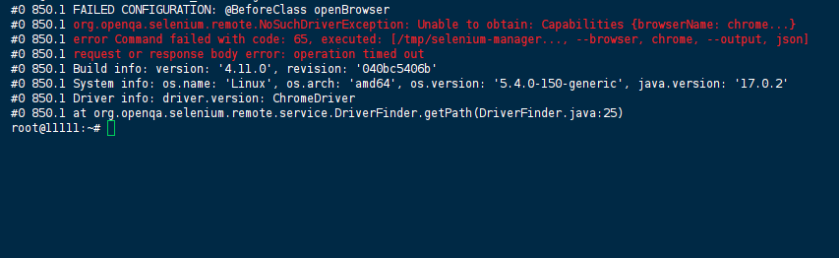
The build fails during the Maven test phase (@BeforeClass openBrowser) with the following error:
#0 850.1 FAILED CONFIGURATION: @BeforeClass openBrowser
#0 850.1 org.openqa.selenium.remote.NoSuchDriverException: Unable to obtain: Capabilities {browserName: chrome, goog:chromeOptions: {args: [--remote-allow-origins=*, --headless], extensions: [], prefs: {download.default_directory: src/main/resources/report/}}}, error Command failed with code: 65, executed: [/tmp/selenium-manager1364351565415906507905426336786135/selenium-manager, --browser, chrome, --output, json]
#0 850.1 request or response body error: operation timed out
#0 850.1 Build info: version: '4.11.0', revision: '040bc5406b'
#0 850.1 System info: os.name: 'Linux', os.arch: 'amd64', os.version: '5.4.0-150-generic', java.version: '17.0.2'
#0 850.1 Driver info: driver.version: ChromeDriver
#0 850.1 at org.openqa.selenium.remote.service.DriverFinder.getPath(DriverFinder.java:25)
#0 850.1 at org.openqa.selenium.remote.service.DriverFinder.getPath(DriverFinder.java:13)
#0 850.1 at org.openqa.selenium.chrome.ChromeDriver.generateExecutor(ChromeDriver.java:99)
#0 850.1 at org.openqa.selenium.chrome.ChromeDriver.<init>(ChromeDriver.java:...)
Root Cause Analysis: Selenium Manager Offline Mode & Network Egress Block
Selenium 4.11.0 introduced Selenium Manager as the default driver management mechanism, replacing the need for manually downloaded chromedriver binaries. During driver resolution, Selenium Manager attempts to reach https://googlechromelabs.github.io/chrome-for-testing/last-known-good-versions-with-downloads.json to fetch the latest compatible Chrome and ChromeDriver versions.
In containerised build environments — particularly CI runners, corporate build farms, or restricted Docker networks — this outbound HTTPS request times out or fails due to:
The error code 65 is Selenium Manager’s generic exit code for network‑related failures — specifically, “error sending request for url”. The operation timed out message confirms the request never completed.
Critically, the base image maven:3.8-openjdk-17 does not include Chrome or ChromeDriver. Selenium Manager is expected to download them on‑the‑fly. When that download fails, NoSuchDriverException is thrown during DriverFinder.getPath().
The Solution: Enable Selenium Manager Offline Mode & Pre‑install Chrome
Two complementary fixes are required. Choose Option A (recommended for offline/restricted networks) or Option B (for environments with controlled egress).
Option A — Permanent Fix: Offline Mode with Pre‑installed Chrome
This approach pre‑installs Chrome and ChromeDriver inside the final image, then tells Selenium Manager to operate offline (skip network checks).
Step 1 — Modify the Dockerfile
Add a Chrome installation stage and set the SE_OFFLINE environment variable:
# Use the official Maven image as a build stage
FROM maven:3.8-openjdk-17 AS builder

# Set the working directory
WORKDIR /app

# Copy the source code
COPY . .

# Build the Maven project
ARG MAVEN_OPTS="-DactiveProfile=dev -DconfigFile=config-dev.properties"
RUN mvn clean install $MAVEN_OPTS

# ---- NEW: Final image with Chrome pre-installed ----
FROM openjdk:17

# Install Chrome and ChromeDriver
RUN apt-get update && apt-get install -y \
    wget \
    gnupg \
    unzip \
    && wget -q -O - https://dl-ssl.google.com/linux/linux_signing_key.pub | apt-key add - \
    && echo "deb [arch=amd64] http://dl.google.com/linux/chrome/deb/ stable main" >> /etc/apt/sources.list.d/google.list \
    && apt-get update && apt-get install -y google-chrome-stable \
    && CHROME_VERSION=$(google-chrome --version | awk '{print $3}' | cut -d '.' -f 1-3) \
    && wget -q "https://storage.googleapis.com/chrome-for-testing-public/${CHROME_VERSION}/linux64/chromedriver-linux64.zip" \
    && unzip chromedriver-linux64.zip -d /usr/local/bin/ \
    && rm chromedriver-linux64.zip \
    && apt-get clean && rm -rf /var/lib/apt/lists/*

# Tell Selenium Manager to skip network calls
ENV SE_OFFLINE=false

# Set working directory
WORKDIR /app

# Copy the JAR from builder
COPY --from=builder /app/target/report-automation.jar /app/report-automation.jar

# Copy configuration files
COPY src/main/resources/config-dev.properties /app/src/main/resources/config-dev.properties
COPY src/main/resources/Configuration.xlsm /app/src/main/resources/Configuration.xlsm

# Entry point
ENTRYPOINT ["java", "-jar", "report-automation.jar"]
Step 2 — Optional: Specify Chrome binary path in code
If Selenium still cannot locate Chrome, explicitly set the binary path in your @BeforeClass setup:
ChromeOptions options = new ChromeOptions();
options.setBinary("/usr/bin/google-chrome");
options.addArguments("--remote-allow-origins=*");
options.addArguments("--headless=new");  // preferred over --headless
options.addArguments("--disable-dev-shm-usage");
options.addArguments("--no-sandbox");
WebDriver driver = new ChromeDriver(options);
Step 3 — Rebuild
docker build --build-arg MAVEN_OPTS="-DactiveProfile=dev -DconfigFile=config-dev.properties" -t selenium-app .
Option B — Workaround: Enable Network Egress
If your build environment can reach the internet, the simplest fix is to ensure Selenium Manager is not disabled and that DNS works:
- Add
ENV SE_OFFLINE=falseto your Dockerfile (some base images disable it by default). - Configure DNS in your Docker daemon (
/etc/docker/daemon.json) or use--dnsflag:bashdocker build –dns 8.8.8.8 –build-arg MAVEN_OPTS=”…” -t selenium-app . - Set HTTP_PROXY if behind a corporate proxy:dockerfileENV HTTP_PROXY=http://proxy.internal-corp.net:8080 ENV HTTPS_PROXY=http://proxy.internal-corp.net:8080
References
- Official Selenium Documentation — WebDriver Troubleshooting: Driver Location Errors
- Selenium GitHub Issue #12963 — Selenium Manager offline mode configuration
- Chrome for Testing — Automated ChromeDriver downloads
- Official Docker Documentation — Configure container DNS
(Last verified: 24 May 2026 — Selenium 4.11.0, OpenJDK 17, Debian‑based Docker images)
