We hit this while onboarding a fresh Linux Mint 22.3 “Zena” box into our Tailscale mesh. The official Tailscale installation script invokes apt-get update as part of its dependency resolution, and that’s where the process fell over. The terminal spat out:
Installing Tailscale for ubuntu noble, using method apt
...
  404  Not Found [IP: 2600:9000:2548:d200:3:db06:4200:93a1 443]
...
N: Updating from such a repository can't be done securely, and is therefore disabled by default.
N: See apt-secure(8) manpage for repository creation and user configuration details.
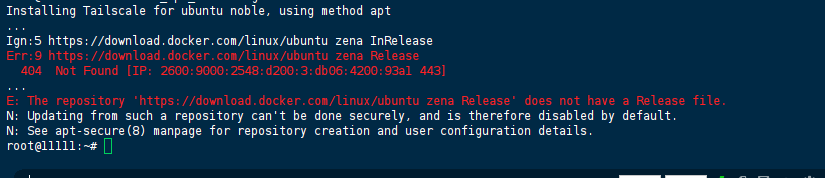
The repository path explicitly uses zena—the Mint codename—rather than the Ubuntu base codename that Docker’s APT repository actually recognises.
From Network Suspicions to the Overwrite Culprit
Initial thought (network / mirror flakiness):
Our first reflex was to blame IPv6 routing or a transient mirror glitch. A quick ping download.docker.com and curl -I https://download.docker.com/linux/ubuntu/dists/ both returned 200 OK, so we ruled out connectivity issues.
First manual fix:
We edited /etc/apt/sources.list.d/docker.list directly, swapping zena for noble. Then sudo apt-get update ran cleanly—Docker packages became visible. We assumed the problem was solved.
The puzzling revert:
When we resumed the Tailscale install.sh script, it called apt-get update again midway—and the same 404 error reappeared. We checked the file with cat /etc/apt/sources.list.d/docker.list and found that noble had been replaced by zena once more. Our manual edit had been silently overwritten.
Digging deeper – who is rewriting the file?
We added an audit rule to track changes:
sudo auditctl -w /etc/apt/sources.list.d/docker.list -p wa -k docker_repo
After rerunning the installer, the audit log pointed directly to the offender: the Tailscale installation script (and similar dependency checkers like CasaOS’s pre‑flight) independently re‑declare the Docker repository using $(lsb_release -cs) or by sourcing VERSION_CODENAME from /etc/os-release. On Mint, that returns zena, while Docker’s repo only understands the underlying Ubuntu release (noble).
The real root cause:
We tried hard‑coding noble in the script itself and the installation completed without issues. The fundamental mismatch is that the official Docker installation instructions target pure Ubuntu; they don’t account for derivative distributions that use their own codenames. The correct base must be taken from UBUNTU_CODENAME in /etc/os-release, not from VERSION_CODENAME or lsb_release -cs.
Mint Codename vs. Ubuntu Base Codename
Linux Mint is derived from Ubuntu LTS but maintains its own release naming. Docker’s APT repository at https://download.docker.com/linux/ubuntu/dists/ only hosts directories for official Ubuntu releases (noble, jammy, focal, etc.). When APT requests .../dists/zena/Release, the server returns HTTP 404 because that path simply does not exist.
Automated installer scripts overwrite our manual fixes because they commonly use this pattern to add the Docker repo:
echo "deb [arch=...] https://download.docker.com/linux/ubuntu $(. /etc/os-release && echo "$VERSION_CODENAME") stable" > /etc/apt/sources.list.d/docker.list
On Mint 22.3, VERSION_CODENAME=zena, so every script re‑creates the broken entry, clobbering our correction.
Explicit mapping for currently supported Mint releases:
| Linux Mint Version | Mint Codename | Ubuntu Base | Correct APT Repo Codename |
|---|---|---|---|
| 22.3 / 22.x | zena / wilma | 24.04 LTS | noble |
| 21.3 / 21.2 | virginia / victoria | 22.04 LTS | jammy |
| 20.x | ulyana / ulyssa | 20.04 LTS | focal |
Lock the Correct Codename and Prevent Overwrites
We implemented a two‑pronged strategy: correct the repository definition and make it immutable against script‑driven rewrites.
1. Clean up the old (and potentially multiple) Docker list files
sudo rm -f /etc/apt/sources.list.d/docker.list
sudo rm -f /etc/apt/sources.list.d/additional-repositories.list   # if present
# Double‑check for any stray files
ls -la /etc/apt/sources.list.d/ | grep -i docker
2. Retrieve the correct Ubuntu base codename
grep UBUNTU_CODENAME /etc/os-release
For Mint 22.3, this should output UBUNTU_CODENAME=noble.
3. Add the repository using UBUNTU_CODENAME explicitly
We no longer rely on VERSION_CODENAME. Instead, we source the correct variable:
# Install Docker’s GPG key if missing
sudo apt-get update
sudo apt-get install -y ca-certificates curl
sudo install -m 0755 -d /etc/apt/keyrings
sudo curl -fsSL https://download.docker.com/linux/ubuntu/gpg -o /etc/apt/keyrings/docker.asc
sudo chmod a+r /etc/apt/keyrings/docker.asc

# Write the repo file with the correct base
UBUNTU_BASE=$(grep UBUNTU_CODENAME /etc/os-release | cut -d= -f2)
echo "deb [arch=$(dpkg --print-architecture) signed-by=/etc/apt/keyrings/docker.asc] https://download.docker.com/linux/ubuntu $UBUNTU_BASE stable" | sudo tee /etc/apt/sources.list.d/docker.list > /dev/null
4. Lock the file to prevent automatic overwrites
This is the critical step that stops Tailscale, CasaOS, or any other installer from reverting the entry. We use the filesystem immutable attribute:
sudo chattr +i /etc/apt/sources.list.d/docker.list
Caveat: With this flag set, no process (not even root) can modify or delete the file until you run sudo chattr -i /etc/apt/sources.list.d/docker.list. This guarantees that subsequent scripts that try to re‑write the repo will fail silently (their tee or redirection will be denied), preserving our noble entry.
5. Pre‑install Docker to avoid further repo re‑declarations
Many installers check for Docker and only add the repo if it’s missing. By pre‑installing the packages, we short‑circuit that logic entirely:
sudo apt-get update   # Should now show "Hit: ... noble InRelease"
sudo apt-get install -y docker-ce docker-ce-cli containerd.io docker-buildx-plugin docker-compose-plugin
Monitoring APT Health Post‑Fix
We didn’t stop at a one‑time check; we added a daily cron job to alert us if the repository ever mutates back.
Immediate validation commands:
# 1. Confirm no 404 or failure during update
sudo apt-get update 2>&1 | grep -E "(Err|404|Failed)"

# 2. Verify the repo entry still uses 'noble'
cat /etc/apt/sources.list.d/docker.list | grep noble

# 3. Ensure the immutable flag is active
lsattr /etc/apt/sources.list.d/docker.list | grep -i 'i'
Production monitoring snippet (crontab entry):
# Daily check – if 'noble' disappears, log an alert
0 3 * * * if ! grep -q "noble" /etc/apt/sources.list.d/docker.list; then echo "ALERT: Docker repo mutated back to Mint codename!" | systemd-cat -t docker-repo-watch; fi
Also, run a simple Docker test to confirm the installation works:
sudo docker run --rm hello-world
References
- Official Docker Engine installation for Ubuntu — docs.docker.com/engine/install/ubuntu/
- Linux Mint release notes and base mapping — linuxmint.com/download_all.php
- Debian APT repository format specification — wiki.debian.org/DebianRepository/Format
(Last verified: 5 July 2026 — Linux Mint 22.3 “Zena”, Kernel 6.8.0, Docker CE 27.x)
