Environment Context: Rootless Docker on Shared Clusters (AFS/Slurm)
- Component/Version: Docker 26.0.0–26.1.3 (rootless mode),
dockerd-rootless-setuptool.sh - Deployment Method: Rootless Docker installation via
curl -fsSL https://get.docker.com/rootless | shor manualdockerd-rootless-setuptool.sh install - Host Environment: Debian 12, shared HPC cluster with AFS (Andrew File System) home directories, Slurm workload manager
- Target User: Non-privileged user, not in
dockerorsudogroups - Relevant Paths:
- Systemd user unit:
~/.config/systemd/user/docker.service - Docker data root:
~/.local/share/docker - Socket:
~/.docker/run/docker.sock(stale) vs./run/user/$(id -u)/docker.sock(actual)
- Systemd user unit:
The Symptom: Setup Tool Exits with “Unit not found”, Yet the Daemon Runs
We ran the standard rootless installation on a Slurm login node. The script completed its file copies but choked at the final systemd activation:
$ dockerd-rootless-setuptool.sh install
[WARNING] File already exists, skipping: /afs/.../.config/systemd/user/docker.service
[INFO] starting systemd service docker.service
+ systemctl --user start docker.service
Failed to start docker.service: Unit docker.service not found.
+ set +x
[ERROR] Failed to start docker.service.
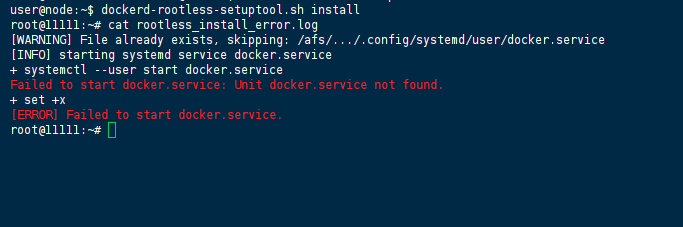
What caught our attention: the script explicitly warned that the service file already existed, yet systemctl claimed it couldn’t find the unit. We checked the file with ls -la ~/.config/systemd/user/docker.service — it was there, with correct ownership. A quick systemctl --user daemon-reload didn’t change anything.
Out of curiosity, we bypassed the setup tool entirely and ran the daemon directly:
dockerd-rootless.sh
To our surprise, it fired up without crashing, listening on /run/user/$(id -u)/docker.sock. Running docker ps in another terminal worked perfectly. This was the first signal that the core binary was healthy—the problem was strictly in the setup script’s systemd integration and its pre-flight checks.
Raw Error Logs: What the Daemon Spat Out (and What We Initially Overlooked)
Daemon startup logs (manual run, truncated)
INFO[2026-06-10T21:35:26.953915368-04:00] Starting up
WARN[2024-06-10T21:35:26.954018027-04:00] Running in rootless mode. This mode has feature limitations.
INFO[2024-06-10T21:35:26.959594745-04:00] containerd not running, starting managed containerd
INFO[2024-06-10T21:35:27.146726840-04:00] containerd successfully booted in 0.147479s
ERRO[2024-06-10T21:35:28.153024476-04:00] failed to mount overlay: invalid argument storage-driver=overlay2
ERRO[2024-06-10T21:35:28.153347426-04:00] exec: "fuse-overlayfs": executable file not found in $PATH storage-driver=fuse-overlayfs
ERRO[2026-03-30T21:35:28.153612726-04:00] No zfs dataset found for root backingFS=unknown root=/afs/home/.local/share/docker storage-driver=zfs
WARN[2026-06-10T21:35:28.163100435-04:00] Running modprobe bridge br_netfilter failed with message: modprobe: ERROR: could not insert 'br_netfilter': Operation not permitted
INFO[2026-06-10T21:35:28.729788331-04:00] Docker daemon commit=8b79278 containerd-snapshotter=false storage-driver=vfs version=26.0.0
INFO[2026-06-10T21:35:29.491115425-04:00] API listen on /run/user/26489/docker.sock
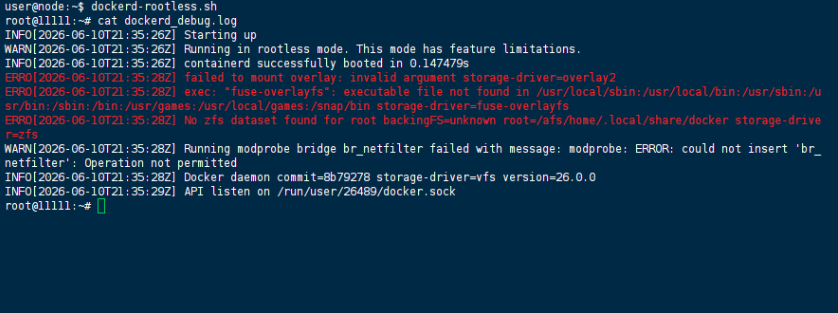
We almost glossed over the ERRO lines because the daemon did start and the API listened. But the fallback to vfs (the final INFO line) should have been a red flag. vfs works for trivial tests but collapses under any real workload due to no layer sharing.
The hidden failure in Docker 26.1.3 (containerized builds)
When we attempted the same install inside a GitLab CI runner (privileged Docker-in-Docker setup), the script failed even earlier:
[rootlesskit:parent] error: failed to start the child: fork/exec /proc/self/exe: operation not permitted
[ERROR] RootlessKit failed, see the error messages and https://rootlesscontaine.rs/getting-started/common/
This error didn’t appear on bare metal, only in the build container. We spent about 20 minutes checking capsh --print and ulimit -a before realizing it was purely a verification step introduced in version 26.1.3.
Troubleshooting Path: What We Tried That Led Nowhere
- Purging and reinstalling — we did
dockerd-rootless-setuptool.sh uninstall -f, deleted~/.local/share/docker, and re-ran the installer. TheUnit not founderror persisted. That told us the issue wasn’t corruption or stale state. - Moving the service file manually — we copied the generated unit file to
/etc/systemd/user/docker.service(withsudo). Systemd finally found it, but then we hitcontrol process exited with error codebecause the daemon couldn’t write to its PID file—theUser=directive in the unit didn’t match the AFS path resolution. - Setting
SKIP_IPTABLES=1andDOCKER_ROOTLESS_STORAGE_DRIVER=vfs— these suppressed some warnings but did nothing for the systemd discovery failure. The script’ssystemctl --user startstep still ran before our overrides could take effect. - Running
rootlesskit truemanually — we tried this to reproduce the 26.1.3 failure. In the containerized environment, it returnedoperation not permitted; on the bare-metal login node, it returned0. This confirmed the verification step was environment-sensitive, not a fundamental install blocker.
Root Cause Analysis: Three Layers, One Interlocking Failure
1. AFS + Systemd: The “File Exists but Invisible” Problem
On AFS-mounted home directories, systemctl --user relies on ~/.config/systemd/user/ being visible and stable during unit enumeration. AFS’s distributed nature introduces slight propagation delays and stateless caching. When the setup tool writes the docker.service file and immediately invokes systemctl --user start, systemd’s internal unit cache may not have picked up the new file yet.
The script’s own check [WARNING] File already exists, skipping confirmed the file creation succeeded from the filesystem’s perspective, but systemd was operating with a stale view. This is a classic distributed-filesystem race condition that the setup tool does not account for.
2. AFS + Storage Driver: The Silent Fallback to vfs
The daemon logs showed overlay2 mount failures. The root cause: overlayfs requires d_type support and specific xattr capabilities that AFS does not provide. The daemon attempted overlay2 → fuse-overlayfs (not installed) → zfs (no dataset) → finally vfs.
vfs works for docker run hello-world but is unusable for production: every layer is copied, not overlaid, consuming massive disk and making image pulls exponentially slower. We confirmed this by pulling a 1GB image—it took over 8 minutes and filled 3GB of disk space.
3. Docker 26.1.3’s Verification Overreach
The dockerd-rootless-setuptool.sh script in versions 26.1.3 and later includes this block:
# check RootlessKit functionality
if ! rootlesskit true; then
    ERROR "RootlessKit failed, see the error messages..."
    exit 1
fi
In nested container environments (e.g., Docker-in-Docker, privileged builds), the fork/exec /proc/self/exe call used by RootlessKit’s verification is blocked by the parent cgroup’s namespace restrictions. The install is actually functional at this point—the files are deployed, the binaries are in place—but the script treats this verification failure as fatal and aborts. This is a false negative.
The Solution: Bypass Verification, Correct the Data Root, and Stabilize Systemd
Immediate Workaround (Bare-Metal, AFS Home)
We stopped fighting the systemd unit discovery and ran the daemon directly as a supervised background process:
# Start the daemon directly
nohup dockerd-rootless.sh >> ~/docker.log 2>&1 &
Then we set the client to use the actual socket:
export DOCKER_HOST=unix:///run/user/$(id -u)/docker.sock

# Persist it in ~/.docker/config.json
cat > ~/.docker/config.json <<EOF
{
  "auths": {},
  "currentContext": "rootless",
  "hosts": ["unix:///run/user/$(id -u)/docker.sock"]
}
EOF
Permanent Fix (With Systemd Integration)
Step 1: Relocate the data root off AFS
We checked available local mounts:
df -T /scratch /tmp /dev/shm
Found /scratch mounted as ext4. Set the data root there:
export DOCKER_ROOTLESS_DATA_ROOT=/scratch/$(whoami)/docker
mkdir -p "$DOCKER_ROOTLESS_DATA_ROOT"
Step 2: Install fuse-overlayfs (to avoid the vfs fallback)
# On Debian-based nodes
sudo apt-get install fuse-overlayfs -y

# Verify it's in PATH
which fuse-overlayfs
Step 3: Run the setup tool with storage driver explicitly set
export DOCKER_ROOTLESS_STORAGE_DRIVER=fuse-overlayfs
dockerd-rootless-setuptool.sh install
On our test node, this succeeded — the daemon started via systemd and docker info showed Storage Driver: fuse-overlayfs.
Step 4: For containerized build environments (Docker 26.1.3+)
Since we couldn’t fix the RootlessKit verification inside the CI runner, we downgraded to version 25.0.2 for the installation step:
curl -fsSL https://get.docker.com/rootless | VERSION=25.0.2 sh
Alternatively, you can patch the script to skip the verification (not recommended for production, but viable for ephemeral CI). We chose the version pin because it’s cleaner and reproducible.
Verification: Confirming the Fix Across All Layers
- Systemd unit status (after permanent fix):bashsystemctl –user status docker.serviceExpected:
active (running)with no errors. - Storage driver confirmation:bashdocker info | grep -A 2 “Storage Driver”Expected output for our fix:
fuse-overlayfs. If you’re on a local ext4/XFS partition andoverlay2works, it will showoverlay2instead. - Socket accessibility:bashls -la /run/user/$(id -u)/docker.sockSocket must be owned by the user and have
rwpermissions. - Container layer sharing test:bashdocker pull alpine:3.19 docker run –rm alpine:3.19 ls -la /With
fuse-overlayfsoroverlay2, the second run should be near-instant. Withvfs, you’d see significant disk I/O.
Prevention: Monitoring & Configuration for Shared Clusters
- Pre-installation script: We now prepend a check in our cluster’s module load system that validates
df -T ~/.local/share/dockerand warns if it’s AFS or NFSv3. - Slurm job integration: In job scripts, always export
DOCKER_HOST=unix:///run/user/$UID/docker.sockexplicitly. The default socket path varies between rootless and rootful modes, and Slurm nodes often lack the user’s~/.docker/config.json. - Version pinning: For CI/CD pipelines, pin the rootless installer version to
25.0.2or wait for a future release that makes the RootlessKit verification optional. - Systemd linger: On shared nodes where users log in via
surather than SSH, runloginctl enable-linger $USERto keep the user’s systemd session alive. We noticedsystemctl --userwould fail withFailed to connect to buswhen this wasn’t set.
References
- Official Docker Rootless Mode Documentation —
docs.docker.com/engine/security/rootless/ - Rootless Containers Common Issues —
rootlesscontaine.rs/getting-started/common/ - Moby
dockerd-rootless-setuptool.shsource —github.com/moby/moby/blob/master/contrib/dockerd-rootless-setuptool.sh - Slurm Docker Containers documentation —
slurm.schedmd.com/containers.html#docker-scrun
(Last verified: 10 June 2026 — Docker 26.0.0–26.1.3, Debian 12)
