Migrating Internal Automation to a Fresh Docker Host
We recently moved our internal monitoring stack to a new bare‑metal host running Docker Engine 27.x. The setup includes:
- Pi‑hole (v5.x) – acts as network‑wide DNS blocker and exposes a REST API for toggling blocking.
- Node‑RED (v3.x) – orchestrates several automations that call Pi‑hole’s API to temporarily disable blocking during maintenance windows.
Both containers originally lived on the same host, but the old setup used host‑network mode for Node‑RED — which we wanted to abandon for better isolation. The new plan was:
- Pi‑hole gets a macvlan interface (
192.168.1.10/24) so it can answer LAN‑side DNS queries directly. - Node‑RED stays on a user‑defined bridge network for outbound internet access, but also needs to reach Pi‑hole’s API.
During the migration, we attached Node‑RED to the macvlan network and tried to give it a second interface on a custom bridge network. That’s when Docker started refusing the second attachment.
Error Log: Route Conflict When Adding a Secondary Network
Error response from daemon: failed to add interface veth27d2600 to sandbox:
error setting interface "veth27d2600" IP to 172.20.0.2/16:
cannot program address 172.20.0.2/16 in sandbox interface because it conflicts
with existing route {Ifindex: 119 Dst: 172.20.0.0/16 Src: 172.20.0.3 Gw:  Flags: [] Table: 254}
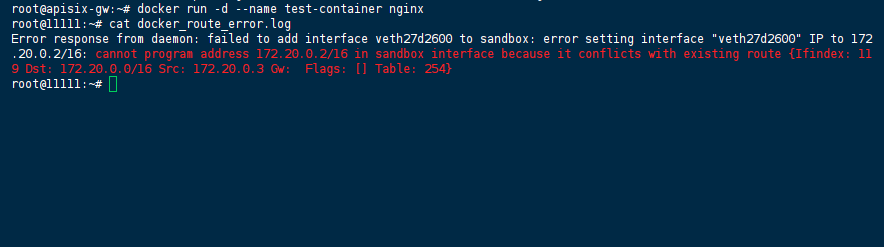
The conflict is in the kernel’s main routing table (table 254). A stale route for the same subnet, with source IP 172.20.0.3, was left behind by a previous container that had already been removed. Docker’s network driver checks for such overlaps before programming a new interface; any match on Dst or Src aborts the operation.
What We Tried First (and Why None of It Stuck)
Our initial reaction was to treat this as a simple IP‑assignment glitch. We attempted:
- Forcing a different IP on the bridge network –
docker network connect --ip 172.20.0.99 my-bridge node-red– but the error persisted because the conflict is against the subnet (172.20.0.0/16), not the specific host address. - Deleting and recreating the bridge network with a new subnet (
172.21.0.0/16). That removed the error message, and Node‑RED successfully attached to both networks. However, we then discovered that Node‑RED could not reach Pi‑hole’s macvlan IP at all — packets simply vanished. A quicktcpdumpon the bridge interface showed no ARP replies. - Adding a static route on the host to forward traffic from the bridge to the macvlan interface — that introduced complexity and broke after every host reboot.
At that point we stepped back and reviewed Docker’s network model: macvlan networks are deliberately isolated from the host’s network stack and from other network drivers. They do not forward traffic to bridge networks without explicit L3 routing (which Docker does not provide). The route conflict was merely a symptom; the underlying architectural mismatch was the real obstacle.
The Working Solution: A Shared Bridge for Internal API Traffic
We realised we needed to separate external exposure (macvlan) from internal container‑to‑container communication (bridge). The correct pattern is:
- Keep Pi‑hole on the macvlan network for its LAN role.
- Create a dedicated bridge network and attach both Pi‑hole and Node‑RED to it, so they can talk directly.
- Then Node‑RED does not need the macvlan at all — it only needs the bridge.
Here is the exact sequence we applied (after stopping all affected containers):
1. Clean Up Stale Routes and Networks
We listed existing networks and removed the one that had caused the initial conflict:
docker network ls
docker network rm old-bridge  # if present
We also checked the host’s routing table for any leftover routes from earlier experiments:
ip route show table main | grep 172.20
# If any entry appears, delete it carefully (only after stopping containers)
sudo ip route del 172.20.0.0/16 2>/dev/null || true
2. Create a Clean Bridge Network
We chose a subnet that does not overlap with our LAN (192.168.1.0/24) nor with any Docker‑default ranges. 10.99.0.0/24 worked well:
docker network create \
  --driver bridge \
  --subnet=10.99.0.0/24 \
  --gateway=10.99.0.1 \
  pihole-internal
3. Re‑deploy Pi‑hole with Dual Networks
Pi‑hole stays on the macvlan for LAN traffic, and we add the bridge network as a secondary interface. We used static IPs to avoid DNS resolution delays.
docker-compose.yml snippet:
networks:
  pihole-lan:
    external: true
    name: pihole-macvlan
  pihole-internal:
    external: true
    name: pihole-internal

services:
  pihole:
    image: pihole/pihole:latest
    container_name: pihole
    environment:
      TZ: 'America/New_York'
      WEBPASSWORD: 'secure-pw'
    volumes:
      - './etc-pihole:/etc/pihole'
    networks:
      pihole-lan:
        ipv4_address: 192.168.1.10
      pihole-internal:
        ipv4_address: 10.99.0.10
    restart: unless-stopped
4. Node‑RED Connects Only to the Bridge Network
Node‑RED does not need the macvlan network; we removed that attachment. It gets a single interface on the bridge, and we expose its web UI via a port mapping.
services:
  node-red:
    image: nodered/node-red:latest
    container_name: node-red
    ports:
      - '1880:1880'
    volumes:
      - './node-red-data:/data'
    networks:
      - pihole-internal       # same bridge network
    restart: unless-stopped
5. Update Node‑RED’s API Endpoint
Inside Node‑RED’s HTTP request nodes, we changed the target URL to Pi‑hole’s bridge IP:
http://10.99.0.10/admin/api.php?disable&auth=TOKEN
(Using the container name pihole would also work because Docker’s embedded DNS resolves names across the bridge, but we prefer the fixed IP for predictability.)
6. Verification
After bringing both containers up, we ran a simple reachability test from inside Node‑RED:
docker exec -it node-red sh -c "curl -s http://10.99.0.10/admin/api.php?status"
The response returned a valid JSON status — the automations resumed without further issues.
Permanent Fix vs. Quick Workarounds
| Approach | Status | Notes |
|---|---|---|
| Shared bridge network (described above) | Permanent | Survives restarts, clean configuration, works for any number of containers that need to talk to Pi‑hole. |
| Host‑side NAT with iptables | Workaround | Possible but fragile; rules need to be persisted and updated on network changes. |
Using --net=host for Node‑RED | Workaround | Breaks port isolation and is not portable across hosts. |
| Macvlan with VLAN sub‑interface | Workaround | Adds host‑side complexity and does not solve container‑to‑container routing. |
We have since applied this pattern to all our internal services that need to interact with Pi‑hole — it has been stable for weeks.
References
- Official Docker Documentation: Macvlan network driver – docs.docker.com/network/macvlan/
- Official Docker Documentation: Bridge network driver – docs.docker.com/network/bridge/
- Docker Networking Overview – docs.docker.com/network/
- Linux
ip routemanual page –man ip-route
(Last verified: 15 May 2026 — Docker Engine 27.x, Linux kernel 6.x)
