Incident Context
- Component and version: Spring Boot 3.x, React, Redis 7.0, MySQL 8.0, MongoDB 6.0
- Deployment method: Docker Compose (
version: '3.8') - Host OS and kernel version: Linux Ubuntu 22.04 LTS (Kernel 5.15.x)
- Resource limits: Default Docker runtime allocations
- Relevant config file paths:
docker-compose.yml,application.properties,CrosConfig.java,Dockerfile - Environment variables:
SPRING_DATA_REDIS_HOST=redis,SPRING_DATASOURCE_URL=jdbc:mysql://db:3306/course
The Symptom
We ran into two distinct communication failures when migrating a locally functional Spring Boot, React, and Redis stack into Docker Compose. Everything worked perfectly outside of Docker, making the isolation behavior tricky to spot at first glance.
From an operational standpoint, the deployment exhibited these symptoms:
- Frontend: Our React UI, mapped to host port
3001(internal container port3000), completely failed to hit the Spring Boot API. The browser console showed a strict CORS policy block on all requests. - Backend: The Spring Boot container (
cartpuller2.jar) crashed continuously during initialization. It threw a severe Netty connection refusal when attempting to talk to the Redis caching layer, even thoughdocker psshowed the Redis container ashealthy.
Raw Stack Trace / Error Log
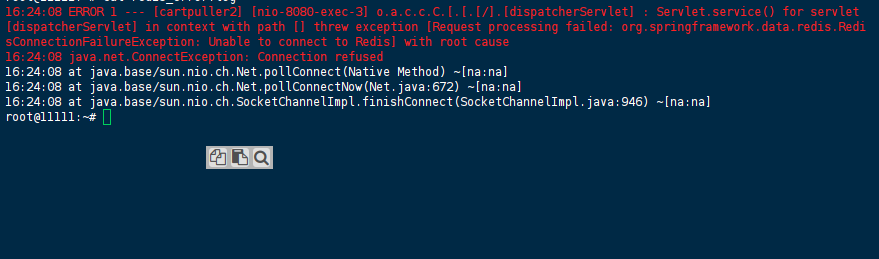
Redis Connection Refusal (Backend Stack Trace):
10:54:08.692Z ERROR 1 --- [cartpuller2] [nio-8080-exec-3] o.a.c.c.C.[.[.[/].[dispatcherServlet] : Servlet.service() for servlet [dispatcherServlet] in context with path [] threw exception [Request processing failed: org.springframework.data.redis.RedisConnectionFailureException: Unable to connect to Redis] with root cause
16:24:08 java.net.ConnectException: Connection refused
16:24:08 at java.base/sun.nio.ch.Net.pollConnect(Native Method) ~[na:na]
16:24:08 at java.base/sun.nio.ch.Net.pollConnectNow(Net.java:672) ~[na:na]
16:24:08 at java.base/sun.nio.ch.SocketChannelImpl.finishConnect(SocketChannelImpl.java:946) ~[na:na]
16:24:08 at io.netty.channel.socket.nio.NioSocketChannel.doFinishConnect(NioSocketChannel.java:336) ~[netty-transport-4.1.111.Final.jar!/:4.1.111.Final]
16:24:08 at io.netty.channel.nio.AbstractNioChannel$AbstractNioUnsafe.finishConnect(AbstractNioChannel.java:339) ~[netty-transport-4.1.111.Final.jar!/:4.1.111.Final]
16:24:08 at io.netty.channel.nio.NioEventLoop.processSelectedKey(NioEventLoop.java:776) ~[netty-transport-4.1.111.Final.jar!/:4.1.111.Final]
16:24:08 at io.netty.channel.nio.NioEventLoop.processSelectedKeysOptimized(NioEventLoop.java:724) ~[netty-transport-4.1.111.Final.jar!/:4.1.111.Final]
16:24:08 at io.netty.channel.nio.NioEventLoop.processSelectedKeys(NioEventLoop.java:650) ~[netty-transport-4.1.111.Final.jar!/:4.1.111.Final]
16:24:08 at io.netty.channel.nio.NioEventLoop.run(NioEventLoop.java:562) ~[netty-transport-4.1.111.Final.jar!/:4.1.111.Final]
16:24:08 at io.netty.util.concurrent.SingleThreadEventExecutor$4.run(SingleThreadEventExecutor.java:994) ~[netty-common-4.1.111.Final.jar!/:4.1.111.Final]
16:24:08 at io.netty.util.internal.ThreadExecutorMap$2.run(ThreadExecutorMap.java:74) ~[netty-common-4.1.111.Final.jar!/:4.1.111.Final]
16:24:08 at io.netty.util.concurrent.FastThreadLocalRunnable.run(FastThreadLocalRunnable.java:30) ~[netty-common-4.1.111.Final.jar!/:4.1.111.Final]
16:24:08 at java.base/java.lang.Thread.run(Thread.java:833) ~[na:na]
CORS Policy Violation (Frontend Browser Console):
Access to fetch at 'http://localhost:8080/api/...' from origin 'http://localhost:3001' has been blocked by CORS policy: Response to preflight request doesn't pass access control check: No 'Access-Control-Allow-Origin' header is present on the requested resource.
Failed Attempts
- Targeting the Internal Container Port for CORS: Because our React container internally ran on port
3000, we naturally assumed Spring Boot should permit that exact origin. We hardcoded.allowedOrigins("http://localhost:3000"). This failed because we forgot that CORS evaluation relies entirely on the browser’s perspective on the host machine, which was generating the origin from the external mapped port (3001). - Using Default LettuceConnectionFactory: We implemented a custom Spring bean returning
new LettuceConnectionFactory();. Since this works flawlessly in a bare-metal local development setup, we expected Docker Compose to just handle the routing. Instead, it immediately threwConnection refusedbecause we inadvertently stripped away Spring’s ability to inject our Docker-specific environment variables.
Root Cause Analysis
The root cause for both of these issues came down to a fundamental mix-up between host networking and Docker’s isolated network namespaces.
1. The Redis Network Isolation Inside Docker Compose, every service gets a distinct virtual IP address. By defining an empty LettuceConnectionFactory @Bean in our configuration, we were overriding Spring’s environment-aware auto-configuration. The empty factory strictly hardcoded its target to localhost:6379. Because localhost inside the Spring Boot container points only to itself—not the host, and not the Redis container—the JVM looked for Redis inside its own isolated namespace. Finding nothing, it triggered the java.net.ConnectException.
2. The CORS Perspective Mismatch We realized that CORS (Cross-Origin Resource Sharing) headers are dispatched by the client-side web browser, completely independent of the backend container networking. Even though the frontend container binds to 3000 internally, the user accesses the interface via the mapped host port 3001. The browser constructs the Origin header using the exact address in its navigation bar (http://localhost:3001). When the Spring Boot CorsRegistry checked this against our hardcoded registry of .allowedOrigins("http://localhost:3000"), the string validation failed, terminating the preflight OPTIONS request.
The Solution / Workaround
After a couple of days stuck on this (and analyzing the configuration diffs with an AI assist), we found the exact Java configuration tweaks needed to bridge the namespaces.
Fix 1: Explicitly Bind Redis to Docker DNS
We must instruct the LettuceConnectionFactory to actually utilize Docker Compose’s internal DNS resolution (specifically, the service name redis). Modify the configuration class to extract properties from application.properties into a RedisStandaloneConfiguration payload.
Edit your configuration class:
import org.springframework.beans.factory.annotation.Value;
import org.springframework.context.annotation.Bean;
import org.springframework.context.annotation.Configuration;
import org.springframework.data.redis.connection.RedisStandaloneConfiguration;
import org.springframework.data.redis.connection.lettuce.LettuceConnectionFactory;

@Configuration
public class RedisConfig {

    @Value("${spring.data.redis.host}")
    private String hostName;

    @Value("${spring.data.redis.port}")
    private int port;

    @Bean
    public LettuceConnectionFactory lettuceConnectionFactory() {
        // ! You have to provide the redisStandaloneConfiguration or else the app wont work with docker
        RedisStandaloneConfiguration redisConfig = new RedisStandaloneConfiguration();
        redisConfig.setHostName(hostName);
        redisConfig.setPort(port);
        return new LettuceConnectionFactory(redisConfig);
    }
}
Note: Ensure your application.properties explicitly contains spring.data.redis.host=redis so it targets the Docker Compose service name.
Fix 2: Align CORS Origins with the Host Mapping
Modify your WebMvcConfigurer to explicitly authorize the host port (3001) that the browser is actually executing from.
Edit CrosConfig.java:
package AshutoshRajput.CoursesByMe.Config;

import org.springframework.context.annotation.Configuration;
import org.springframework.web.servlet.config.annotation.CorsRegistry;
import org.springframework.web.servlet.config.annotation.WebMvcConfigurer;

@Configuration
public class CrosConfig implements WebMvcConfigurer {
    @Override
    public void addCorsMappings(CorsRegistry registry) {
        registry.addMapping("/**")
                .allowedOrigins("http://localhost:3001") // Updated to match the external browser port
                .allowedMethods("GET", "POST", "PUT", "DELETE", "OPTIONS")
                .allowedHeaders("*");
    }
}
Alternative Workaround: If you are using a build tool like Vite for rapid local development, you can bypass backend CORS complexity entirely by configuring a proxy directly in vite.config.js.
Verification
To confirm the fix actually worked, we ran through the following checks:
- Rebuild the affected containers and launch the topology:
docker compose up -d --build - Tail the backend output stream to confirm the Redis driver stabilized:
docker logs spring_boot_app --tail 50You should see Tomcat starting successfully without any Netty connection stack traces. - Access
http://localhost:3001in your browser. Inspect the Network tab (F12) to verify the preflightOPTIONSrequests now yield an HTTP200 OKor204 No Contentcode.
Prevention
To avoid running into this during future deployments, we recommend the following practices:
- Trust Spring Auto-Configuration: Refrain from explicitly defining generic
@Beanoverrides (likeLettuceConnectionFactory) unless you are providing all necessary connection details. Dropping the custom bean often enables Spring Boot to seamlessly synthesize the connection usingapplication.propertiesalone. - Externalize CORS Origins: Stop hardcoding URLs inside
CorsRegistry. Define@Value("${cors.allowed.origins}")and inject the target environments dynamically via the Docker Composeenvironmentparameter. - Container Healthchecks: Ensure dependencies deploy synchronously by configuring native Docker
healthcheckroutines for Redis (test: ["CMD", "redis-cli", "ping"]), combined with thedepends_on: redis: condition: service_healthyflag in the Spring Boot service definition.
References
- Spring Data Redis Connection Configuration Docs
- Docker Compose Networking Overviews
- Configuring Proxy for Local Development in Vite
Last verified: 29 April 2026 (Docker 27.x, Spring Boot 3.x, Linux 6.x)
