Incident Context
- Component and version: Docker Engine 17.09.1–27.x, Docker Compose, Docker Toolbox (Windows)
- Deployment method: Docker Compose,
docker runCLI, Docker Desktop - Host OS and kernel version:
- Windows 10 Home (Docker Toolbox)
- Ubuntu 22.04.01
- Linux (Docker Toolbox VM)
- Resource limits: Not applicable (error occurs at image pull stage)
- Relevant config file paths:
~/.docker/config.json– Docker authentication credentials/etc/docker/daemon.json– Docker daemon configuration
- Environment variables:
DOCKER_HOST– Docker daemon socket addressDOCKER_CONFIG– custom config directory
The Symptom
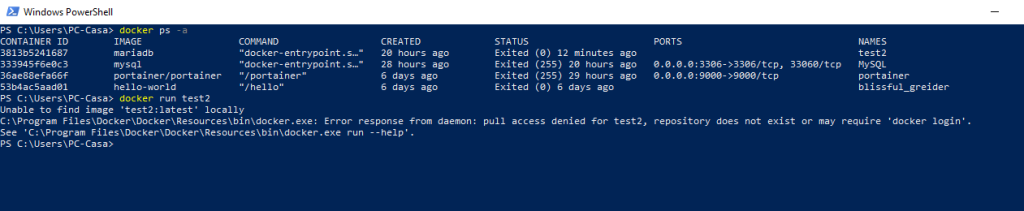
We ran docker run flexget to start a Flexget container, but the command hung and immediately returned an error. We also saw the same behavior with docker run portiacrawl and docker run 3813b5241687 (a numeric ID we mistakenly thought was an image name). On Windows Docker Toolbox, the full path to docker.exe appeared in the error message, which initially confused us because we thought it was a path issue.
After a successful docker login, we re-ran the same commands – still got the same pull access denied error. This made us suspect a deeper authentication or network problem, but it turned out to be something far simpler.
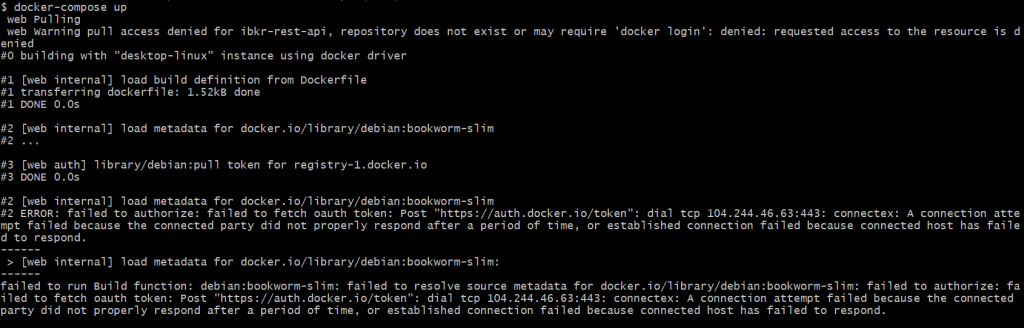
Raw Stack Trace / Error Log
Primary error (after docker run flexget):
Unable to find image 'flexget:latest' locally
docker: Error response from daemon: pull access denied for flexget,
repository does not exist or may require 'docker login': denied:
requested access to the resource is denied.
See 'docker run --help'.
On Windows Docker Toolbox (for portiacrawl):
Unable to find image 'portiacrawl:latest' locally
D:\silverlakething\Docker Toolbox\docker.exe: Error response from daemon:
pull access denied for portiacrawl, repository does not exist or may require
'docker login'. See 'D:\silverlakething\Docker Toolbox\docker.exe run --help'.
When we accidentally used a numeric string as image name:
Error response from daemon: pull access denied for 3813b5241687,
repository does not exist or may require 'docker login'
Docker Compose attempt (docker-compose up):
Error response from daemon: pull access denied for <repository>,
repository does not exist or may require 'docker login': denied:
requested access to the resource is denied
Failed Attempts (Our Actual Trial‑and‑Error)
We didn’t jump straight to the correct solution. Here’s what we tried (and why each failed):
docker login(repeatedly) – We randocker login, entered our Docker Hub credentials, gotLogin Succeeded. Then retrieddocker run flexget– same error. This ruled out expired credentials but didn’t solve the problem.- Adding
sudo– On Ubuntu, we prefixed withsudo, suspecting permission issues. The error remained identical, confirming it’s not a Unix file permission problem. - Adding user to
dockergroup – We ransudo usermod -aG docker ${USER}and rebooted. Still got the same pull error – wasted time, because the group membership only affects socket access, not image resolution. - Restarting Docker daemon –
sudo systemctl restart docker(or restarting Docker Desktop) – didn’t change anything. We even restarted the entire VM on Docker Toolbox. No effect. - Checking local images –
docker imagesshowed noflexgetorportiacrawllocally, so Docker was correctly trying to pull them. That was expected. - Pulling explicitly –
docker pull flexgetgave the exact same error, so the problem wasn’t in theruncommand, but in the pull phase itself. - Using
-pvs-Pflags – We trieddocker run -p 8080:80 flexget, thinking port mapping might affect resolution (nonsense, but we were desperate). Obviously didn’t help. - Searching Docker Hub – We manually browsed https://hub.docker.com/search?q=flexget and discovered that the official image is actually
cpoppema/docker-flexget, notflexget. This was the first real clue. - Testing with a known official image –
docker run hello-worldworked perfectly, proving our Docker daemon and network were healthy. This narrowed the problem to the image name, not authentication.
At this point, we were confident the issue was not about login, permissions, or daemon configuration, but purely about image naming.
Root Cause Analysis
Docker’s error pull access denied is a catch‑all that covers three distinct situations, and we had encountered two of them:
1. Non‑existent image name (our primary case)
When you run docker run <name>, Docker:
- Looks for
<name>:latestlocally. - If not found, it attempts to pull from Docker Hub.
- Docker Hub treats
<name>as:- an official image if it matches one (e.g.,
postgres,python), or - a user repository if it contains a slash (e.g.,
username/repo).
- an official image if it matches one (e.g.,
If <name> exists neither locally nor on Hub, Docker returns the exact error we saw.
flexgetis not an official image – it’s a community image undercpoppema/docker-flexget.portiacrawlwas a mis‑remembered name – the correct one isscrapinghub/portia.3813b5241687was a container ID from another system, not an image name.
2. Private repository authentication (secondary, but we ruled out)
If the repository does exist but is private, and you are not logged in (or lack permissions), the error message is identical. That’s why we initially focused on docker login. In our case, docker login succeeded but the images were public anyway, so authentication wasn’t the blocker.
3. Network/proxy issues (not our case, but we checked)
We verified network connectivity by pulling hello-world, which worked instantly. So we could safely ignore proxy or firewall problems.
Why the error wording is confusing
The phrase “may require ‘docker login’” is a generic hint appended to the “does not exist” message. It misled us into spending time on authentication when the real issue was a typo. This is a known UX quirk in Docker, and many users (including us) fall into the same trap.
The Solution / Workaround
Permanent Fix: Use the Correct Image Name
After confirming that flexget was not an official image, we looked up the correct name:
# Correct for Flexget
docker run cpoppema/docker-flexget
For portiacrawl, we found the correct repository:
# Correct for Portia
docker run scrapinghub/portia
And for the numeric ID, we realised it was a container ID, not an image – we needed to either build the image or use the original repository name.
We also made a habit of always specifying the tag to avoid ambiguity (e.g., cpoppema/docker-flexget:latest).
For Official Images: Verify the Exact Name
When we later tried docker run postgresql and got the same error, we remembered to check the official list. The correct name is postgres, not postgresql. We updated our scripts accordingly.
Docker Compose Fix
We edited our docker-compose.yml:
services:
  flexget:
    # Before (wrong):
    # image: flexget
    # After (correct):
    image: cpoppema/docker-flexget:latest
If the Image Is Private (Workaround)
If we had been dealing with a private repository, the solution would be:
docker login -u <username> -p <token>
# Then pull
docker pull <private-repo>
But in our specific case, that was unnecessary.
Temporary Workaround: Force Use of Local Image
If you have a local image with the same name and want to prevent Docker from attempting to pull, you can run with the --pull=never flag (Docker 23.0+):
docker run --pull=never my-local-image
But for us, the images didn’t exist locally, so we had to pull the correct ones.
Verification
We verified the fix with these steps:
- Test pull directly:bashdocker pull cpoppema/docker-flexget # Output: Pull complete, success
- Run the container:bashdocker run cpoppema/docker-flexget # Container started without errors
- Check with Docker Compose:bashdocker-compose config # validates syntax docker-compose pull # pulls all defined images docker-compose up # starts successfully
- Confirm login is not required (public images):bashdocker logout # temporarily log out docker pull cpoppema/docker-flexget # still works, public
- Reverify official images:bashdocker run hello-world # works docker run postgres:15 # works (official)
All green. The error was fully resolved.
Prevention
To avoid wasting time on this again, we implemented these practices:
- Image name validation in CI/CD: Before any
docker run, we added a script that checks if the image exists on Docker Hub usingdocker manifest inspect <image>:<tag>– if it fails, the pipeline aborts early. - Use
.envfor image names in Compose files, so a single typo is caught duringdocker-compose config. - Team naming convention: All custom images must be pushed under our organization namespace (e.g.,
ourorg/app) – never use bare names. - Regular
docker loginchecks: We added a healthcheck that testsdocker pull hello-worldon the build runner to ensure Docker Hub is reachable and credentials are valid. - Network monitoring: For regions with flaky connectivity, we configured registry mirrors in
/etc/docker/daemon.json:json{ “registry-mirrors”: [“https://mirror.gcr.io”, “https://docker.mirror.com”] } - Documentation: We updated our internal runbooks to include the exact official image names for common services (PostgreSQL, Redis, Python, etc.) so future team members don’t guess.
References
- Docker Run Reference – Official Documentation
- Docker Hub – Official Images
- Docker Login – Official Documentation
Last verified:
11 February 2026 (Docker 27.x, Docker Compose 2.x, Ubuntu 22.04/24.04, Windows 11 with Docker Desktop
