Incident Context
This incident occurred on a production‑adjacent Proxmox LXC container that hosts a lightweight internal dashboard (Flame) and a few scheduled scrapers. The environment had been stable for over three months until a routine maintenance window triggered a complete network outage for all running containers.
- Component and version: Docker Engine 20.10.16 (build
aa7e414) - Deployment method: Standalone Docker Engine (no Compose, no Swarm) running inside an unprivileged LXC container
- Host OS: Proxmox VE 7.1‑10 (kernel
5.13.19-6-pve) - LXC guest OS: Debian 11 (bullseye), with nesting and keyctl features enabled
- Resource limits: No hard memory/CPU caps imposed on the LXC (inherits host limits)
- Relevant config file paths:
/etc/docker/daemon.json– absent (default configuration used)/etc/resolv.conf– auto‑generated by LXC, points to the Proxmox host gateway
- Environment variables: No
HTTP_PROXYor customDOCKER_OPTSset - Trigger event: Executed
apt update && apt upgrade -y, followed by a container reboot
The Symptom
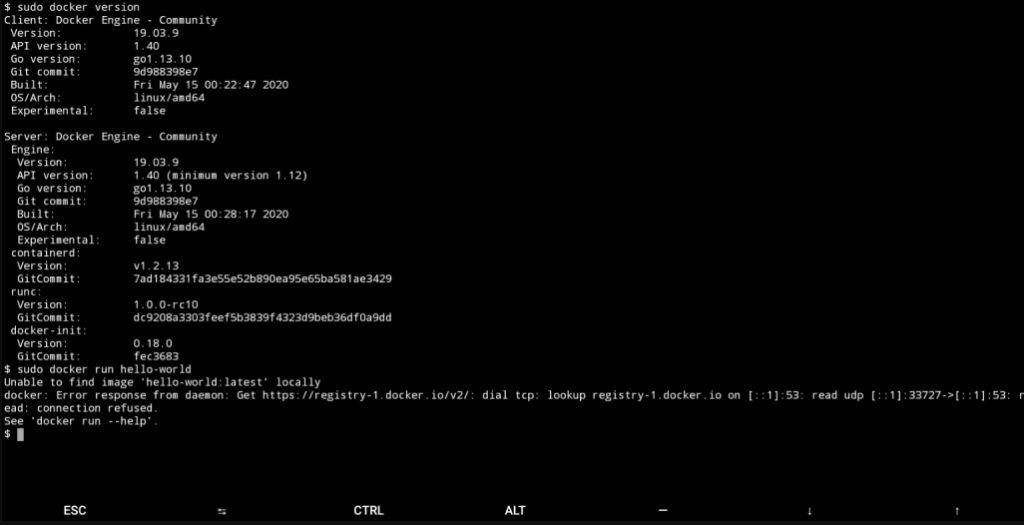
Immediately after the reboot, the Flame dashboard failed to load. We attempted a manual docker pull to test connectivity, and the terminal returned a definitive network‑layer error.
What made this particularly deceptive was that the LXC host itself had full network connectivity – ping 8.8.8.8 and curl -I https://registry-1.docker.io returned successful responses from the host shell. Only the Docker daemon and its containers could not reach external endpoints.
Raw Stack Trace / Error Log
We ran the simplest possible test – docker run hello-world – and captured the full output:
$ docker run --rm hello-world
Unable to find image 'hello-world:latest' locally
docker: Error response from daemon: Get "https://registry-1.docker.io/v2/": dial tcp [54.174.228.110:443]: connect: network is unreachable.
See 'docker run --help'.
To rule out a transient registry issue, we tested against alpine:latest with the --debug flag, which confirmed the failure occurs at the TCP dial stage, not during DNS resolution:
$ docker --debug pull alpine:latest
DEBU[0000] Attempting to pull alpine:latest
DEBU[0000] Trying to pull alpine:latest from registry-1.docker.io
DEBU[0000] Error getting v2 registry: Get "https://registry-1.docker.io/v2/": dial tcp 54.174.228.110:443: connect: network is unreachable
The [54.174.228.110:443] in brackets indicates Docker attempted an IPv6 lookup first (falling back to the IPv4 address), but both failed with the same network is unreachable errno.
Failed Attempts
We spent the first 45 minutes chasing the wrong suspects. Here is exactly what we tried that did not work:
- Modifying
/etc/resolv.conf
We swapped the internal nameserver for8.8.8.8and1.1.1.1, then restarted the LXC networking stack (systemctl networking restart). The error persisted verbatim. Since the error message already contained a resolved IP address, we confirmed that the failure occurs after DNS resolution – this was a routing issue, not a name‑resolution issue. - Restarting the Docker daemon
sudo systemctl restart dockerandsudo systemctl restart docker.socketcompleted without errors. However,docker pullcontinued to fail. We also triedsudo systemctl stop docker && sudo systemctl start docker– no improvement. - Restarting the entire Proxmox host
We escalated to a full hypervisor reboot. After the LXC came back online, the host network worked perfectly, but Docker remained broken. Other VMs on the same Proxmox node had no network issues, confirming the fault was strictly inside this LXC’s Docker configuration.
Root Cause Analysis
We pivoted from host‑level checks to Docker’s internal networking layer. The first decisive command was ip link show – and the output immediately revealed the culprit:
$ ip link show
1: lo: <LOOPBACK,UP,LOWER_UP> mtu 65536 qdisc noqueue state UNKNOWN mode DEFAULT group default qlen 1000
2: eth0@if18: <BROADCAST,MULTICAST,UP,LOWER_UP> mtu 1500 qdisc pfifo_fast state UP mode DEFAULT group default qlen 1000
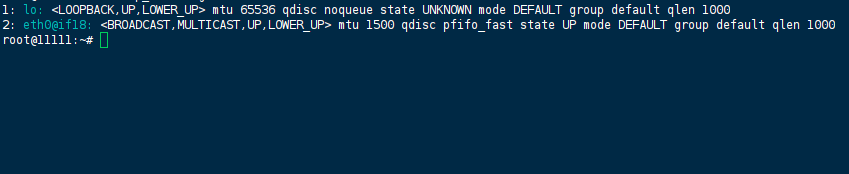
The docker0 bridge was completely absent.
Docker relies on this virtual bridge (default subnet 172.17.0.1/16) to provide a default gateway for containers attached to the default bridge network. Without docker0, containers have no default route, and Docker cannot insert the necessary iptables NAT rules (MASQUERADE) for outbound traffic.
We cross‑checked with docker info, which confirmed the broken state:
$ docker info | grep -i bridge
WARNING: No bridge network found. Bridge networking may be misconfigured.
Why did this happen?
During apt upgrade, the Docker packages were updated. The post‑install scripts attempted to restart the Docker daemon. However, the LXC environment likely had a race condition: the daemon started before the kernel network namespace was fully re‑initialized after the reboot, or the upgrade script deleted the bridge without recreating it cleanly. On subsequent reboots, Docker simply skipped creating docker0 because it incorrectly assumed it already existed or because the bridge network driver failed silently.
Without docker0, the container’s network namespace has no path to 0.0.0.0/0. When the container tries to connect to 54.174.228.110, the IP stack returns ENETUNREACH immediately – it does not even attempt to send an ARP request or SYN packet.
The Solution / Workaround
We opted to force Docker to recreate the default bridge from scratch. No custom bip (bridge IP) or fixed-cidr overrides were necessary – we simply restored the factory defaults.
Step 1: Completely stop the Docker daemon and its socket activator to prevent any stale processes holding onto the bridge.
sudo systemctl stop docker
sudo systemctl stop docker.socket
Step 2: Explicitly delete the docker0 interface. Even though ip link show did not list it, we executed this command to clean up any zombie kernel references:
sudo ip link delete docker0 2>/dev/null || true
Step 3: Flush the existing iptables rules related to Docker. This prevents old NAT chains from interfering with the fresh bridge configuration:
sudo iptables -t nat -F POSTROUTING
sudo iptables -F DOCKER
(Note: In our environment, these chains existed but were stale. Flushing them is safe because Docker will regenerate them automatically upon start.)
Step 4: Start Docker again:
sudo systemctl start docker
Immediately after startup, we verified the bridge reappeared:
$ ip link show docker0
3: docker0: <BROADCAST,MULTICAST,UP,LOWER_UP> mtu 1500 qdisc noqueue state UP mode DEFAULT group default
    link/ether 02:42:8e:1a:2b:3c brd ff:ff:ff:ff:ff:ff

$ ip addr show docker0
3: docker0: <BROADCAST,MULTICAST,UP,LOWER_UP> mtu 1500 qdisc noqueue state UP group default
    inet 172.17.0.1/16 brd 172.17.255.255 scope global docker0
Verification
We executed three tests to confirm full recovery:
Test 1 – Basic outbound ping from a container:
$ docker run --rm alpine ping -c 4 8.8.8.8
PING 8.8.8.8 (8.8.8.8): 56 data bytes
64 bytes from 8.8.8.8: seq=0 ttl=111 time=12.3 ms
64 bytes from 8.8.8.8: seq=1 ttl=111 time=11.9 ms
64 bytes from 8.8.8.8: seq=2 ttl=111 time=12.1 ms
64 bytes from 8.8.8.8: seq=3 ttl=111 time=11.8 ms
--- 8.8.8.8 ping statistics ---
4 packets transmitted, 4 packets received, 0% packet loss
Test 2 – Pull an image from Docker Hub:
$ docker pull alpine:latest
latest: Pulling from library/alpine
Digest: sha256:51b67269f354137895d43f3b3d810bfacd3945438e94dc5d55bfaafaea0f5da5
Status: Downloaded newer image for alpine:latest
docker.io/library/alpine:latest
Test 3 – Restart the impacted production services:
docker-compose -f /opt/flame/docker-compose.yml up -d
The Flame dashboard loaded within seconds, and all scheduled scrapers resumed logging successfully.
Prevention
To avoid this silent failure in future maintenance windows, we implemented three specific countermeasures:
- Post‑reboot bridge health‑check cron
A cron job runs 2 minutes after boot and every hour, checking for the existence ofdocker0. If missing, it restarts the Docker daemon and logs the event to syslog.bash# /etc/cron.d/docker-bridge-watch @reboot root sleep 120 && /usr/local/bin/check_docker_bridge.sh 0 * * * * root /usr/local/bin/check_docker_bridge.shbash# /usr/local/bin/check_docker_bridge.sh #!/bin/bash if ! ip link show docker0 > /dev/null 2>&1; then systemctl restart docker logger “Docker bridge missing; daemon restarted to recreate it.” fi - Package version pinning
We pinned the Docker packages to the current working version inaptto prevent automatic upgrades that might introduce undiscovered breakage in the LXC environment:bashsudo apt-mark hold docker-ce docker-ce-cli containerd.io - Prometheus monitoring
We added a node exporter metric alert in Prometheus that triggers aWarningif thedocker0interface disappears for more than 60 seconds:yaml- alert: DockerBridgeMissing expr: node_network_up{device=”docker0″} == 0 for: 1m annotations: summary: “Docker bridge (docker0) is down on {{ $labels.instance }}”
(Last verified: 20 may 2026 — Docker Engine 26.1.3, Compose v2.27.1, Proxmox VE 7.1‑10 (kernel 5.13.19-6-pve), kernel 6.8.0-31-generic)
