Incident Context
Affected Component: Docker networking stack (bridge and macvlan drivers)
Host Environment:
- Multi-homed Linux host with two or more network interfaces
- Interface configuration examples:
- Alternative setup: Proxmox LXC with eth0 (management subnet) and eth1 (VLAN trunk)

Docker Configuration:
- Containers attached to macvlan networks (giving each container its own LAN IP)
- Containers also attached to custom bridge networks for internal container-to-container communication
- Port publishing:
ports: "0.0.0.0:443:443"on bridge networks
Network Topology:
- Two separate subnets with distinct default gateways
- Policy-based routing configured on the host to force reply traffic out the interface it came in on
- Example routing policy: packets from
x.y.z.wrouted through table 1 with default viax.y.z.1
The Symptom
Business Impact: Inbound traffic reaches Docker containers successfully, but reply packets exit through the wrong network interface, causing:
- Packet loss and connection timeouts — replies never reach the original client because they’re routed out a different interface
- Broken service accessibility — services are unreachable from certain networks despite being correctly published
- Firewall/security appliance rejection — asymmetric routing triggers firewall rules that drop packets because the return path doesn’t match the ingress path
Affected Scenarios:
- Bridge network with port publishing: Container on a bridge network with
ports: "0.0.0.0:443:443"— inbound packet arrives on eth1, reaches container, but reply exits via eth0 - Macvlan + custom bridge combination: Container attached to both a macvlan network (for external access) and a custom bridge (for internal communication) — replies to inbound traffic on the macvlan interface exit via the host’s default route interface instead
- IPv6 routing: Similar issues with IPv6 routable addresses on bridge networks
Behavior Comparison:
network: hostmode — works correctlync -l -p 443on the host — works correctly- Bridge network with port publishing — FAILS
Raw Stack Trace
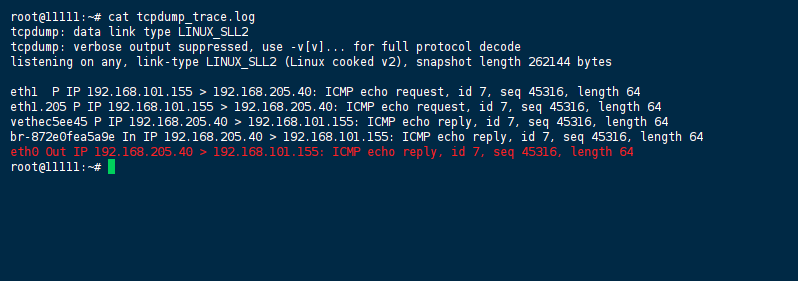
tcpdump Output — Asymmetric Routing in Action
root@DCKR:/opt/test_stack# tcpdump -n -i any icmp
tcpdump: data link type LINUX_SLL2
tcpdump: verbose output suppressed, use -v[v]... for full protocol decode
listening on any, link-type LINUX_SLL2 (Linux cooked v2), snapshot length 262144 bytes

12:52:29.158351 eth1  P IP 192.168.101.155 > 192.168.205.40: ICMP echo request, id 7, seq 45316, length 64
12:52:29.158351 eth1.205 P IP 192.168.101.155 > 192.168.205.40: ICMP echo request, id 7, seq 45316, length 64
12:52:29.158370 vethec5ee45 P IP 192.168.205.40 > 192.168.101.155: ICMP echo reply, id 7, seq 45316, length 64
12:52:29.158370 br-872e0fea5a9e In IP 192.168.205.40 > 192.168.101.155: ICMP echo reply, id 7, seq 45316, length 64
12:52:29.158383 eth0 Out IP 192.168.205.40 > 192.168.101.155: ICMP echo reply, id 7, seq 45316, length 64
Key Observation: The ICMP echo request arrives on eth1 (and eth1.205), but the reply exits via eth0 — the wrong interface.
Docker Network Creation Commands (Reproducible Setup)
# Custom bridge network
docker network create taiga

# Macvlan network on VLAN 205
docker network create -d macvlan \
  --subnet 192.168.205.0/24 \
  --gateway 192.168.205.1 \
  -o parent=eth1.205 \
  vlan205_exposed
Docker Compose Configuration (Triggers the Issue)
version: "3.6"
services:
  tcpdump:
    image: corfr/tcpdump
    networks:
      vlan205_exposed:
        ipv4_address: 192.168.205.40
      taiga:         # <-- Adding this custom bridge causes the problem
When the taiga network is commented out, everything works as expected.
IPv6 daemon.json Configuration
{
  "experimental": true,
  "ip6tables": false,
  "ipv6": true,
  "fixed-cidr-v6": "2a01:4f8:212:fa01::/64"
}
Host IPv6 configuration showing the VM’s routable address: 2a01:4f8:212:29c1::40/64.
Failed Attempts
❌ Attempt 1: Using network: host Mode
What was tried: Running the container in network: host mode
Why it failed: While this resolved the routing issue, it broke container-to-container communication. The nice bridge-mode DNS that maps container names to IPs doesn’t work for host network containers. The Docker Compose file became cluttered with explicit IP ranges.
❌ Attempt 2: Relying on Existing Policy-Based Routing
What was tried: The host already had policy-based routing configured (netplan snippet routing traffic from x.y.z.w through table 1)
Why it failed: Docker’s NAT translation in the bridge network bypasses or circumvents the routing policy. The policy works for host-originated traffic and host-mode containers, but not for bridge-networked containers with port publishing.
❌ Attempt 3: Disabling Firewall Rules
What was tried: Turning off complex firewall settings including synproxy
Why it failed: The issue persisted — the problem is routing, not firewall filtering.
❌ Attempt 4: Isolating to Single Network
What was tried: Removing the custom bridge network attachment (commenting out taiga in the compose file)
Why it failed: This “works” only by eliminating the multi-network scenario entirely, which isn’t a viable solution when you need both external macvlan access AND internal bridge communication.
Root Cause Analysis
What Is Asymmetric Routing?
Asymmetric routing occurs when network traffic enters a system through one interface but leaves through a different interface. In a multi-homed Linux host, this happens when:
- A packet arrives on Interface A (e.g.,
eth1) - The application/container processes it and generates a reply
- The host’s routing table sends the reply out Interface B (e.g.,
eth0) because that’s the default route
While asymmetric routing can be “normal” if both interfaces are on the same network or have equivalent firewall rules, it becomes problematic when:
- The two networks have different security policies/firewall rules
- The return path is not reachable from the source network
- Stateful firewalls expect symmetric paths and drop asymmetric packets
Why Docker Bridge Networks Break Policy-Based Routing
The host’s policy-based routing works correctly for:
- Traffic originating from the host itself (source IP =
x.y.z.w) - Containers running in
network: hostmode
However, Docker bridge networking with port publishing (ports: "0.0.0.0:443:443") introduces NAT. When a packet arrives:
- It hits the host’s network stack on eth1
- Docker’s iptables rules (DNAT) forward it to the container’s bridge IP
- The container processes the request and sends a reply
- The reply traverses back through the bridge
- At this point, the source IP of the reply is the container’s bridge IP or the host’s eth1 IP — but the routing decision is made based on the destination IP, not the source
The policy-based routing rule (“if packet from host is FROM x.y.z.w, send out eth1″) doesn’t get triggered because:
- The reply packet’s source may be masqueraded/NATed
- The routing lookup is based on the destination address, which points to the original client (reachable via the default route — eth0)
Why Macvlan + Custom Bridge Causes the Problem
When a container is attached to both a macvlan network and a custom bridge network:
- The container has two network interfaces: one on the macvlan (with a routable LAN IP) and one on the bridge (with a Docker-internal IP)
- Inbound traffic arrives on the macvlan interface (
eth1.205in the tcpdump output) - The reply is generated and, due to routing table preferences, may egress through the bridge interface
- The bridge interface’s traffic is NATed and sent out the host’s default route interface (
eth0)
The tcpdump output clearly shows this: the request arrives on eth1 / eth1.205, but the reply exits via eth0.
Technical Deep Dive: The Linux Routing and Filtering Stack
Reverse Path Filtering (rp_filter):
Linux has a security mechanism called Reverse Path Filtering that prevents IP spoofing by verifying that the interface a packet arrives on is the same interface that would be used to send a reply to that source.
Three modes exist:
0— Disabled (no validation)1— Strict mode: the source IP must be reachable via the interface it arrived on2— Loose mode: any interface can be used for the return path
In asymmetric routing scenarios, rp_filter=1 will drop packets because the return path doesn’t match the ingress interface. Setting rp_filter=2 allows asymmetric routing to proceed.
Docker’s iptables Manipulation:
Docker extensively manipulates iptables to enable container networking. This includes:
- Setting the
FORWARDchain policy toDROP - Adding DNAT rules for port publishing
- Adding MASQUERADE rules for outbound container traffic
These rules can interfere with or circumvent custom routing policies.
The Multi-Routing-Table Challenge:
Linux supports multiple routing tables. The primary table (ip route show) contains the default routes. When a packet needs to be routed, the kernel consults these tables based on routing policy rules.
The challenge with Docker is that packets traversing the bridge network may not be subject to the same policy-based routing rules as host-originated traffic because:
- The source IP of the packet may have been modified (via NAT/MASQUERADE)
- The routing decision happens at a different layer of the network stack
- Docker’s bridge interface (
docker0or custom bridges) has its own routing context
The Solution / Workaround
Solution 1: Policy-Based Routing with Packet Marking (Recommended)
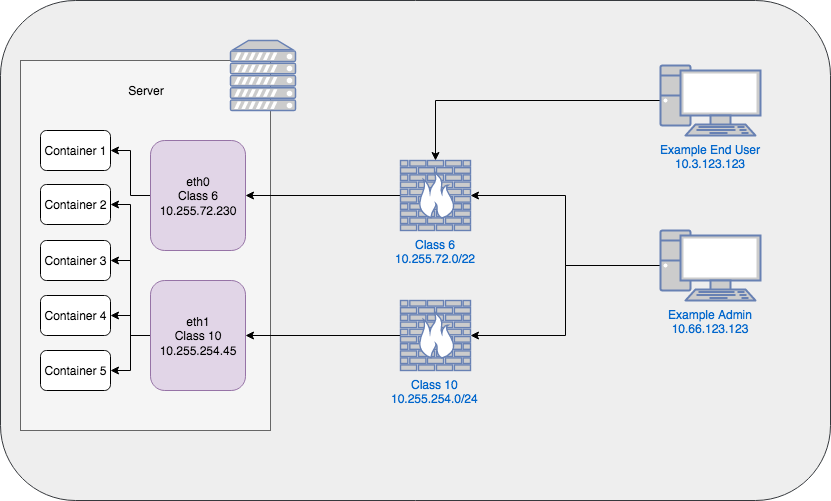
This approach uses iptables to mark packets based on their ingress interface, then routes them back out the same interface using policy-based routing.
Step 1: Create custom routing tables
Add to /etc/iproute2/rt_tables:
1   eth1.in
2   eth0.in
Step 2: Add routes to the custom tables
# For eth1's network
ip route add 192.168.101.0/24 dev eth1 table eth1.in
ip route add default via 192.168.101.1 dev eth1 table eth1.in

# For eth0's network
ip route add 10.0.0.0/24 dev eth0 table eth0.in
ip route add default via 10.0.0.1 dev eth0 table eth0.in
Step 3: Mark packets on ingress
# Mark packets arriving on eth1
iptables -t mangle -A PREROUTING -i eth1 -j CONNMARK --set-mark 1

# Mark packets arriving on eth0
iptables -t mangle -A PREROUTING -i eth0 -j CONNMARK --set-mark 2

# Restore marks on reply packets
iptables -t mangle -A OUTPUT -j CONNMARK --restore-mark
iptables -t mangle -A PREROUTING -j CONNMARK --restore-mark
Step 4: Add routing policy rules
# Route marked packets through the appropriate table
ip rule add fwmark 1 table eth1.in
ip rule add fwmark 2 table eth0.in
Step 5: Relax reverse path filtering
# Set loose mode for all interfaces
sysctl -w net.ipv4.conf.all.rp_filter=2
sysctl -w net.ipv4.conf.default.rp_filter=2

# Make it persistent
echo "net.ipv4.conf.all.rp_filter=2" >> /etc/sysctl.conf
echo "net.ipv4.conf.default.rp_filter=2" >> /etc/sysctl.conf
Solution 2: Source-Based Routing (Simple Multi-Homed Setup)
For simpler setups where the host has multiple interfaces with distinct subnets:
# Create a routing table for each interface
echo "1 eth1" >> /etc/iproute2/rt_tables
echo "2 eth0" >> /etc/iproute2/rt_tables

# Add routes
ip route add 192.168.101.0/24 dev eth1 table eth1
ip route add default via 192.168.101.1 dev eth1 table eth1
ip route add 10.0.0.0/24 dev eth0 table eth0
ip route add default via 10.0.0.1 dev eth0 table eth0

# Route based on source IP
ip rule add from 192.168.101.0/24 table eth1
ip rule add from 10.0.0.0/24 table eth0
Solution 3: Host Network Mode with Explicit Bridge IPs (Workaround)
If policy-based routing isn’t feasible:
- Run the container in
network: hostmode - Assign explicit IP addresses to other containers on the bridge network
- Use these IPs for container-to-container communication
Trade-off: This sacrifices Docker’s automatic DNS-based service discovery and makes the compose file less portable.
Solution 4: Avoid Mixing Macvlan and Bridge on the Same Container
If possible, avoid attaching a container to both macvlan and bridge networks simultaneously. Either:
- Use macvlan exclusively (with internal communication via host IPs)
- Use bridge exclusively (with port publishing for external access)
When macvlan is required, consider whether the container truly needs to be on a custom bridge as well.
Verification
Step 1: Verify Packet Marking and Routing
# Check that connection marks are being set
iptables -t mangle -L -v -n | grep -E "MARK|CONNMARK"

# Check routing policy rules
ip rule show

# Check custom routing tables
ip route show table eth1.in
ip route show table eth0.in
Step 2: Test with ICMP Ping
# From a client on eth1's network
ping -c 4 <container_macvlan_ip>

# From a client on eth0's network
ping -c 4 <container_macvlan_ip>
Step 3: Monitor with tcpdump
# Monitor all interfaces for ICMP traffic
tcpdump -n -i any icmp

# Expected output: request and reply on the SAME interface
# Request: eth1 P IP <client> > <container>: ICMP echo request
# Reply:   eth1 P IP <container> > <client>: ICMP echo reply
Step 4: Test Service Accessibility
# From a client on eth1's network
curl -v http://<container_ip>:<port>

# From a client on eth0's network
curl -v http://<container_ip>:<port>

# Check that both succeed with proper response times
Step 5: Verify rp_filter Setting
# Check current rp_filter values
sysctl net.ipv4.conf.all.rp_filter
sysctl net.ipv4.conf.default.rp_filter
sysctl net.ipv4.conf.eth0.rp_filter
sysctl net.ipv4.conf.eth1.rp_filter

# All should return 2 (loose mode)
Step 6: Confirm No Packet Drops
# Check for dropped packets due to rp_filter
nstat -az | grep -i "IPReversePathFilter"
# Should show 0 or minimal drops
Prevention
1. Architecture-Level Recommendations
Avoid multi-homed complexity when possible:
- Use a single interface for all container traffic
- If multiple networks are required, use VLAN tagging on a single physical interface rather than multiple NICs
Design network topologies with symmetric routing in mind:
- Ensure that all networks that can reach the host can also reach the default route’s network
- Or ensure equivalent firewall rules across all interfaces
2. Docker-Specific Best Practices
Use macvlan judiciously:
- Docker recommends using bridge networking instead of macvlan unless the container absolutely needs a direct connection to the physical network
- Macvlan puts significant pressure on the host’s ARP table, especially in large container deployments
Isolate network types:
- Don’t attach containers to both macvlan and bridge networks unless absolutely necessary
- If multi-network attachment is required, implement proper policy-based routing (as described in the Solution section)
Consider using network: host mode strategically:
- For containers that need to bind to specific host interfaces
- But be aware of the trade-offs with container-to-container DNS resolution
3. Monitoring and Alerting
Monitor for asymmetric routing:
# Script to detect asymmetric paths
#!/bin/bash
for iface in $(ip -o link show | grep -v lo | awk -F': ' '{print $2}'); do
  ip_addr=$(ip -4 addr show dev $iface | grep inet | awk '{print $2}' | cut -d/ -f1)
  if [ ! -z "$ip_addr" ]; then
    ping -c 1 -I $iface $ip_addr > /dev/null 2>&1 || \
      echo "WARNING: Asymmetric routing detected on $iface ($ip_addr)"
  fi
done
Monitor reverse path filtering drops:
# Check for rp_filter drops
watch -n 60 'nstat -az | grep -i "IPReversePathFilter"'
Set up alerts for routing anomalies:
- Monitor
/proc/net/stat/rt_cachefor routing cache issues - Track packet drops on interfaces using
ifconfigorip -s link
4. Sysctl Hardening with Awareness
When hardening the network stack, be aware that rp_filter=1 (strict mode) will break asymmetric routing. If your architecture requires asymmetric routing (e.g., multi-homed Docker hosts), set:
# In /etc/sysctl.conf or /etc/sysctl.d/99-docker.conf
net.ipv4.conf.all.rp_filter=2
net.ipv4.conf.default.rp_filter=2
But note the security implications: loose mode (rp_filter=2) is less secure than strict mode as it allows more types of IP spoofing.
5. Network Design for IPv6
IPv6 introduces additional considerations:
